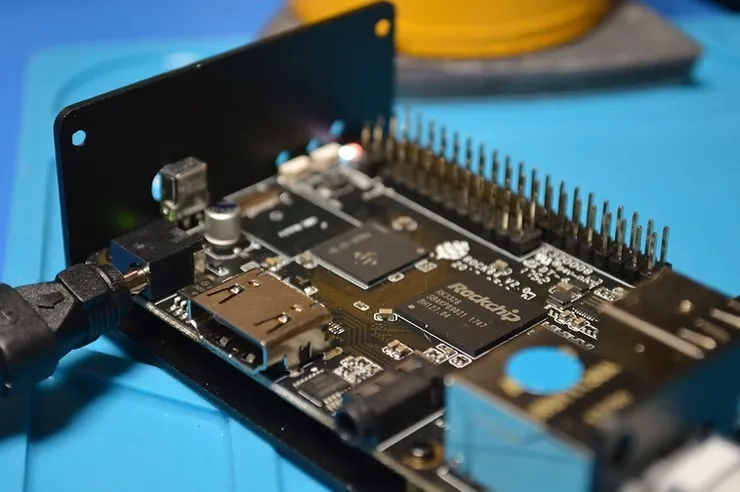
WebRTC has become a cornerstone for real-time communication in web applications, enabling seamless audio, video, and data streaming directly in the browser. However, when it comes to IoT and embedded devices, leveraging WebRTC in a browser may not be the most efficient option. This is where compiling LibWebRTC natively for ARM devices comes into play. By doing so, developers can create highly optimized applications that significantly reduce CPU usage, resulting in lower power consumption and improved performance—key factors for IoT and embedded systems.
When you compile LibWebRTC for ARM, especially in the context of IoT and embedded devices, you unlock the potential to run real-time communication applications natively on ARM processors. This approach offers several advantages over using WebRTC within a browser, such as reduced latency, better resource management, and enhanced performance. The result is a more stable and reliable communication experience, which is crucial for applications in resource-constrained environments like smart homes, industrial IoT, and other embedded systems.
WebRTC for Embedded: Steps to Compile LibWebRTC for ARM
Compiling LibWebRTC for ARM, particularly for IoT and embedded devices, requires a few detailed steps. The following guide will help you through the process:
1. Set Up the Build Environment
Start by preparing an Ubuntu environment, either directly on an ARM device or on an x86 machine if you plan to cross-compile for ARM. Ensure that all necessary dependencies, such as Python, Git, and the build-essential package, are installed.
Fetch the LibWebRTC source code using the following commands:
fetch --nohooks webrtc
cd src
gclient sync
3. Explore Available GN Build Options
Before generating the GN build files, it’s beneficial to review all available build options. This step ensures that you configure your build optimally for your IoT or embedded ARM device.
gn args out/Default --list
This command lists all configurable GN build options, allowing you to tailor the build process to your specific needs.
4. Set Up GN Configuration
Generate GN build files tailored to the target architecture, either ARM32 or ARM64.
For ARM32:
gn gen out/arm32 --args='target_os="linux" target_cpu="arm" is_debug=false is_clang=true use_custom_libcxx=false'
For ARM64:
gn gen out/arm64 --args='target_os="linux" target_cpu="arm64" is_debug=false is_clang=true use_custom_libcxx=false'
Selecting the correct target_cpu (either arm for ARM32 or arm64 for ARM64) is crucial for optimizing the build for your IoT or embedded device.
5. Compile the Code
Once the GN configuration is set, you can proceed to compile the code using Ninja.
For ARM32:
ninja -C out/arm32
For ARM64:
ninja -C out/arm64
The compilation process may take some time, depending on your system’s hardware capabilities.
6. Deploy and Test
After successfully compiling LibWebRTC for ARM, deploy the binaries to your target IoT or embedded device. Comprehensive testing is essential to ensure that all functionalities are working correctly and that the performance benefits specific to your device are realized.
Note:
While compiling for ARM devices, one should use this option is_clang=truewhich is required to compile the neon flags available in the ARM architecture for video rendering acceleration. The default GCC in the Ubuntu-based Linux systems is not capable of compiling these flags and complains about neon flags. Therefore, it is advisable to use the clang already provided by the LibWebRTC to compile it rather than using the system’s default C++ compiler which is GCC.
Summary
Compiling LibWebRTC for ARM devices, particularly in the context of IoT and embedded systems, offers significant advantages over using browser-based WebRTC. Native compilation allows you to fine-tune applications to run efficiently on ARM processors, resulting in lower CPU usage, reduced power consumption, and enhanced performance. This is especially important for IoT and embedded devices where resources are limited, and efficiency is paramount.
For businesses operating in the IoT and embedded systems domain, optimizing WebRTC for ARM devices by compiling LibWebRTC natively opens up a world of possibilities. It enables the delivery of high-quality video calls, low-latency data streaming, and efficient resource usage—all critical factors for success in this field. Whether you’re developing applications for remote healthcare, smart home devices, or industrial automation, the ability to provide reliable, real-time communication on low-powered ARM CPUs is a game-changer that can drive innovation and efficiency in your solutions.
We recently built a C++ video application for ARM devices (both 32-bit and 64-bit) to work with our existing cloud video infrastructure. From our recent experience, we can say that it’s not an easy task and needs significant effort to compile & build a native C++ video application. If you also have an IOT / Embedded video conferencing/streaming use case and don’t know where to start, do shout at hello@centedge.io. You also can schedule a video call with us to discuss your use case using our Meetnow page.
In today’s digital-first world, enterprises are increasingly looking to enhance their workflows with real-time video communication capabilities. Whether it’s for a cloud contact center, customer engagement, or internal collaboration, WebRTC (Web Real-Time Communication) has emerged as the backbone for building custom video calling, conferencing, and live streaming applications. However, building a production-ready, enterprise-grade custom real-Time audio/video solution using WebRTC is no small feat. It requires careful planning, technical expertise, and a clear understanding of business needs.
Here are the top five points enterprises should consider before embarking on the journey of building and integrating a custom WebRTC application:
1. Define Business Use Cases and User Experience Requirements
Before diving into development, it’s crucial to outline the specific business use cases and the user experience (UX) goals. Are you building a customer-facing video support solution, an internal collaboration tool, or a live streaming platform for events? Each use case has distinct requirements for latency, resolution, and feature sets such as screen sharing, recording, or chat integration. Additionally, consider:
Target audience and their technical proficiency.
Device compatibility (web, mobile, and native applications).
Regulatory requirements, such as HIPAA for healthcare or GDPR for customer data privacy.
A well-defined scope not only ensures a smoother development process but also aligns the solution with your business goals.
2. Ensure Scalability and Reliability
For enterprise-grade applications, scalability and reliability are non-negotiable. Video calls with hundreds of participants or live streams with thousands of viewers demand robust infrastructure. When planning your architecture:
Opt for distributed servers and load balancers to handle peak traffic.
Implement mechanisms to recover from failures, such as session restoration.
Ensure low-latency media streaming for real-time interaction if it is a critical requirement for your application with techniques like media server cascading.
WebRTC itself doesn’t offer a signaling protocol—you’ll need to design or integrate one to manage session initiation, participant connection, and message exchange. Using standards like WebSocket or MQTT can provide the required reliability for signaling.
3. Optimize for Network Conditions and Bandwidth Management
Unstable network conditions can severely degrade the user experience in a real-time application. Enterprises should prioritize:
Adaptive bitrate streaming to dynamically adjust video quality based on network bandwidth.
Packet loss recovery techniques such as forward error correction (FEC).
Configuring TURN (Traversal Using Relays around NAT) and STUN (Session Traversal Utilities for NAT) servers to ensure seamless peer-to-peer connections, even behind firewalls.
Testing the application across various network scenarios, including low bandwidth and high latency, is essential to delivering a consistent experience.
4. Incorporate Advanced Security Features
Security is a critical concern for enterprises, especially in industries like healthcare, finance, and government. WebRTC encrypts media streams by default using DTLS-SRTP, but additional measures should be considered:
Implementing end-to-end encryption for sensitive communications.
Using secure signaling channels (e.g., HTTPS and WSS).
Regular security audits and compliance with standards such as ISO 27001.
Additionally, access control mechanisms, like token-based authentication, can prevent unauthorized use and ensure that only authenticated users can access the system.
5. Plan for Long-Term Maintenance and Updates
Building a custom WebRTC solution is not a one-time investment. As technologies and user needs evolve, so must your application. Enterprises should:
Set up continuous monitoring and analytics to track performance and usage.
Regularly update the application to address security vulnerabilities and incorporate new WebRTC standards.
Invest in skilled developers who understand the nuances of WebRTC and its ecosystem.
Moreover, ensure your solution can integrate with other enterprise systems, such as CRM, ERP, or cloud contact center platforms, to provide a seamless workflow.
Alternatives to Building a Enterprise-Grade Custom Real-Time Audio/Video Solutions
While building a custom WebRTC application offers complete control and customization, it can be resource-intensive and time-consuming. For enterprises that want to fast-track implementation or lack in-house expertise, leveraging commercially available programmable video SDK solutions is a viable alternative. Vendors like Samvyo.com provide enterprise-grade APIs and SDKs that enable businesses to integrate video conferencing, live streaming, and real-time communication into their workflows without starting from scratch.
These solutions come pre-built with essential features like:
Scalable infrastructure to handle high traffic.
Pre-configured security and compliance mechanisms.
Advanced analytics and monitoring tools.
Using a programmable video SDK not only reduces development time but also ensures a production-ready, reliable solution that can be tailored to your specific business needs. By partnering with trusted providers, enterprises can focus on delivering value to their users rather than managing the complexities of WebRTC development.
Final Thoughts
Enterprises looking to integrate real-time video communication into their workflows have a strategic decision to make: build a custom solution or leverage a programmable video SDK. While custom development offers unparalleled flexibility, it demands significant investment in time, resources, and expertise. On the other hand, commercially available SDKs from providers like Samvyo.com offer a faster and more cost-effective path to integration, enabling enterprises to stay agile in a competitive market.
Ultimately, the choice depends on your organization’s priorities, resources, and long-term vision. Whether you opt for a custom-built WebRTC application or a ready-to-use SDK, the key is to align the solution with your business objectives and deliver a seamless, secure, and scalable user experience.
If you are an Enterprise looking for professional help for your planning process before venturing out to building Enterprise-Grade Custom Real-Time Audio/Video solutions for integrating to some of your critical business workflows, feel free to drop us an email athello@centedge.io for a free 30mins strategic discussion session for diving deep into your requirement to provide you with the correct ingredients required to realize your requirement without time and cost overruns. You can reach out to us using this link as well.
As urbanization drives the construction of high-rise buildings, elevators have become an essential component of modern infrastructure. With millions relying on these systems daily, ensuring passenger safety has never been more critical. This white paper explores the evolution of safety elevators, current market dynamics, and how WebRTC technology can redefine safety standards by enabling real-time two-way video communication.
A Brief History of Safety Elevators
The invention of the safety elevator revolutionized urban architecture, enabling skyscrapers and high-rise buildings. Elisha Otis introduced the first safety elevator in 1852, a system that incorporated a fail-safe brake mechanism to prevent the elevator from plummeting in case of rope failure. Since then, elevators have become indispensable, evolving from simple manual controls to advanced automated systems equipped with state-of-the-art safety features.
The Growing Importance of Safety Elevators
With the rapid urbanization of cities worldwide, safety elevators have seen exponential growth. According to market reports, the global elevator market is expected to reach $135 billion by 2030, driven by increased high-rise construction and stricter safety regulations. As cities grow vertically, ensuring the safety of elevator passengers during emergencies has become a paramount concern for manufacturers and regulators alike.
Rethinking Elevator Safety: The Role of Two-Way Video Calling Systems
While traditional safety systems like alarms and emergency stop buttons have been effective, they often fall short in addressing real-time emergencies, such as medical crises or mechanical failures. Two-way video calling systems offer a transformative solution, enabling real-time communication between passengers and emergency response teams. This technology can bridge critical gaps in emergency response, providing instant visual and auditory information that aids faster and more effective rescue planning.
Current Emergency Response Technologies in Elevators
Most modern elevators are equipped with:
Emergency intercoms for audio communication.
Alarm buttons to alert building security.
Automatic emergency braking systems for mechanical safety.
However, these legacy systems often lack the real-time visual context required for effective decision-making during complex emergencies.
WebRTC: Enhancing Safety with Real-Time Video Communication
WebRTC (Web Real-Time Communication) introduces a paradigm shift by enabling high-quality, low-latency video and audio communication directly between elevator occupants and rescue teams. Its benefits include:
Improved situational awareness through live video feeds.
Faster response times as rescue teams receive real-time updates.
Enhanced passenger confidence during emergencies.
Unlike traditional systems, WebRTC-based solutions operate efficiently without relying on centralized servers, ensuring robust performance even in challenging network conditions.
Challenges in Hardware Integration
Integrating a WebRTC-based video calling system into elevator hardware poses unique challenges:
Limited CPU Power: Elevator control units typically run minimalistic Linux-based operating systems with low processing capabilities.
Absence of Browsers: Many systems lack browser environments necessary for running WebRTC applications.
Hardware Constraints: Limited support for video and audio processing, leading to potential performance bottlenecks.
Building a Native WebRTC Solution for hardware integrations
To overcome these challenges, Videoedge developed a highly optimized solution:
Native libWebRTC Build: Custom-compiled WebRTC libraries for target hardware.
C++ Application: Designed to leverage RTC peer connection objects for establishing calls.
Media Capture: Implemented browser-equivalent getUserMedia functionalities for camera and microphone access.
Rendering Layer: Utilized GStreamer and libgtk for efficient video/audio rendering.
Hardware Acceleration: Exploited available GPU resources to offload processing tasks, minimizing CPU load.
Multithreading: Distributed tasks across multiple threads to avoid bottlenecks and ensure smooth video and audio streams.
Beyond Elevators: Broader Industrial Applications
The same WebRTC-based capabilities can revolutionize workflows in:
Industry 4.0: Real-time video monitoring of manufacturing processes.
Advanced Automotive Use Cases: Video telematics for driver assistance and remote diagnostics.
Other Industrial Scenarios: Enhanced safety and communication in mines, oil rigs, and remote construction sites.
Case Study: Revolutionizing Emergency Response for a Global Elevator Manufacturer
Centedge recently partnered with one of the world’s largest elevator manufacturers to design a cutting-edge emergency response system. By adhering to the principles outlined above, we successfully delivered a WebRTC-based two-way video calling system that:
Operates seamlessly on low-powered hardware, a dual-core 900Mhz NXP IMX6 processor: This processor is responsible for the entire operation of the Elevator unit including its core Linux-based OS and the entire application layer built on top of the OS layer for smooth elevator operation. The mandate provided to us was to keep the CPU usage < 70% while running a crystal clear audio/video call along with all other elevator processes running. We were able to achieve the mandate while keeping the CPU usage at 62% while running a 2-way WebRTC-powered video call along with all other elevator processes.
Provides crystal-clear video and audio streams for real-time communication: The goal was to achieve the best possible audio/ video quality while trying to keep the CPU utilization below 70%. With a lot of experimentation, we found, that 320X240 at 10fps is the sweet spot that provides a clear 2-way audio/video while keeping the overall CPU utilization at 62%.
Meets rigorous safety and compliance standards: Rigorous testing was done on the actual production hardware under various scenarios to find out issues and fix them proactively.
This solution significantly reduced response times and enhanced the overall safety of elevator passengers.
Elevator Safety with WebRTC: Conclusion
As the demands for safety and real-time communication continue to grow, Centedge’s unique and custom WebRTC-based solutions are setting new standards for emergency response systems. Whether it’s elevators, industrial workflows, or advanced automotive applications, our technology is designed to adapt and excel in diverse environments. If your organization is looking to enhance safety and operational efficiency, let Centedge tailor a solution that meets your unique requirements.
If you are an Enterprise looking to build Enterprise-Grade Custom Real-Time Audio/Video solutions with hardware integrations for integrating into some of your critical business workflows, here is a link to the list of services we provide for Embedded/IOT integration use cases for WebRTC. Feel free to drop us an email athello@centedge.io for a free 30mins strategic discussion session, if you feel a discussion with us would be an important starting point. This session would be exclusively for diving deep into your requirements to provide you with the correct ingredients required to realize your requirements without time and cost overruns. You can reach out to us using this link as well.
Feel free to take a look at the Videoedge Video API/SDK to speed up your development process without having to build the entire application from scratch. With Videoedge SDK, you get the entire backend ready to be deployed into multiple geographies across the world within a week’s time.
References:
Here is a blog we wrote some time ago on how to compile and build the native Libwebrtc for a target CPU type of ARM, responsible for enabling 2-way video calling natively on a hardware device without a dependency on browsers.
In today’s fast-paced business world, customers expect more from brands than just products or services—they want personalized, seamless, and immediate support. The evolution of customer support systems, particularly cloud contact centers, has played a pivotal role in meeting these demands. As businesses shift from traditional telephony-based systems to cloud solutions, they are unlocking a new realm of possibilities for customer engagement and satisfaction. In this blog, we’ll explore the growing importance of cloud contact centers, their benefits, and how integrating advanced features like video calling, CRM systems, and webinars can take customer support to new heights.
What is a Cloud Contact Center and How It Differs from Legacy Telephony-Based Contact Centers?
A cloud contact center is a virtual call center hosted on the internet rather than relying on physical hardware or traditional telephony infrastructure. This solution leverages cloud computing technology to route calls, manage interactions, and provide support without the need for complex on-site setups.
The key difference between cloud-based and legacy telephony contact centers lies in the underlying technology. Traditional telephony contact centers rely heavily on dedicated hardware, such as PBX (Private Branch Exchange) systems, and are often tied to a fixed office location. This limits scalability, flexibility, and the ability to adapt to new communication channels.
Cloud contact centers, on the other hand, operate in a virtual environment, enabling agents to work from anywhere. They support multiple communication channels—voice, chat, email, and social media—integrating seamlessly with a brand’s CRM and offering advanced analytics. This flexibility allows businesses to scale up or down quickly based on demand, and at a fraction of the cost of traditional systems.
Benefits of a Cloud Contact Center without IVR Over a Legacy Telephony/IVR-Based System
The shift from legacy telephony systems to cloud contact centers provides organizations with an array of benefits that directly impact both operational efficiency and customer satisfaction. Here’s a deeper look into the advantages of cloud contact centers:
Scalability and Flexibility: Cloud contact centers are inherently scalable, enabling businesses to quickly expand or contract based on demand. Unlike traditional telephony systems, which often require complex upgrades and additional hardware, cloud solutions allow businesses to add new agents or services seamlessly. This scalability is crucial for handling seasonal surges in customer interactions or business growth.
Cost Efficiency: Cloud solutions significantly reduce the costs associated with maintaining physical infrastructure, such as servers and on-premise PBX systems. Businesses can leverage subscription-based pricing models, which are cost-effective and eliminate upfront hardware investment. This financial flexibility allows companies to allocate resources toward customer experience enhancements and other strategic initiatives.
Advanced Features and Integration: Cloud contact centers support advanced functionalities such as omnichannel communication, real-time analytics, and AI-powered automation, which are difficult or costly to implement in legacy systems. Features like predictive routing, speech recognition, and chatbots enable businesses to handle customer interactions with greater accuracy and efficiency, improving the overall customer experience.
Enhanced Security: Cloud providers offer robust security protocols, including encryption, multi-factor authentication, and compliance with industry regulations (e.g., GDPR, HIPAA). These features ensure that customer data is protected with the highest standards, which can be a significant challenge for traditional telephony systems that often lack such integrated security measures.
Running Cloud Contact Centers with IVR Numbers/Systems: Emerging Challenges
While IVR (Interactive Voice Response) systems have been a cornerstone of traditional contact centers, their integration into cloud-based platforms introduces a set of challenges that can hinder the customer experience. These issues are becoming more apparent as customer expectations evolve:
Customer Frustration: The complexity and impersonal nature of traditional IVR systems can leave customers frustrated. Navigating through long menus or encountering dead-ends often leads to negative experiences. Customers increasingly prefer to bypass these barriers with direct access to agents or support teams who can offer personalized assistance.
Lack of Contextual Awareness: IVR systems typically rely on pre-programmed decision trees that can’t adapt to real-time customer contexts. When a customer calls in with a specific issue or query, IVRs often fail to understand the nuances of the problem, which results in a less efficient service and can lead to unnecessary transfers to human agents.
Inefficiency in Complex Queries: IVRs are great for simple, routine tasks (e.g., checking account balances or tracking orders), but they become ineffective when customers face complex issues that require more nuanced support. In these cases, IVR-driven contact centers often see longer resolution times and increased customer dissatisfaction.
Missed Opportunities for Personalization: With IVRs, customers are often treated like case numbers, rather than individuals. A lack of personalization in these systems means that brands miss the opportunity to engage customers in meaningful ways, leaving them feeling less valued.
Browser/Mobile App-Based Calling: A New Era of Customer Experience
The integration of browser and mobile app-based calling solutions is fundamentally transforming customer interactions in cloud contact centers. This shift not only removes the dependency on traditional telephony systems but also empowers businesses to offer more efficient, seamless, and engaging experiences:
No Need for Dedicated Hardware: With browser and mobile app-based calling, businesses eliminate the need for expensive and bulky telephony hardware. Customers can initiate calls directly from a website or app with just a click, which simplifies the process and improves accessibility.
Real-Time Assistance: These systems allow for faster, more fluid customer interactions. With integrated chat, voice, and video, agents can resolve issues more effectively and offer real-time assistance, leading to faster issue resolution and fewer follow-ups.
Enhanced Engagement and Interactivity: Browser and app-based calls enable additional features like screen sharing, file transfers, and chat functionality. These interactive elements help agents better understand customer issues and provide more personalized solutions. For instance, a customer experiencing an issue with a product can show it to the agent via video, allowing for quicker troubleshooting.
Increased Convenience for Customers: Customers can reach support teams instantly from their mobile devices or browsers without needing to make a phone call. This convenience ensures customers can connect with agents when they need help most, which directly impacts satisfaction levels and fosters loyalty.
The Power of Website and Mobile App-Based Calling for Customer Support
Website and mobile app-based calling solutions are redefining how businesses approach customer support. These integrated solutions offer numerous advantages in terms of security, ease of integration, customer experience, and operational efficiency:
Security and Data Protection: Web and app-based calling systems utilize secure connections that protect customer data during interactions. With encryption protocols in place, businesses ensure that sensitive information remains private, which is especially important for industries dealing with financial or personal data.
Seamless Integration with CRM Systems: These solutions integrate effortlessly with existing CRM platforms, enabling support agents to access comprehensive customer profiles during each interaction. This integration helps businesses provide contextually aware support, speeding up resolution times and ensuring that customers don’t have to repeat themselves.
Ease of Use and Convenience: One-click calling functionality simplifies the process for customers, eliminating the need for dialing phone numbers or navigating through IVR menus. Whether via a website or mobile app, the process is intuitive, which enhances the overall customer experience and reduces friction during interactions.
Better Customer Experience and Satisfaction: Providing customers with direct, instant access to support, without the hassle of navigating multiple touchpoints, fosters positive interactions. As customers can reach out to support teams through their preferred communication method, whether on desktop or mobile, their satisfaction is higher, leading to improved CSAT scores.
The Role of Video Calling in Cloud Contact Centers
Incorporating video calling into a cloud contact center is rapidly becoming an essential capability, enabling businesses to provide more dynamic and engaging customer support. Video calling creates a richer, more personalized interaction compared to traditional voice calls:
Enhanced Personalization: Video calling brings a human element to remote interactions. By seeing the customer’s face and body language, agents can respond more empathetically and tailor their communication to the individual’s needs, building stronger relationships and trust.
Visual Problem-Solving: Video calls are especially valuable in industries where visual guidance is essential, such as in technical support, medical consultations, or product troubleshooting. Customers can demonstrate the problem, and agents can walk them through the resolution process visually, reducing confusion and ensuring faster solutions.
Increased CSAT Scores: Offering the option to switch from voice to video calls improves the customer experience by adding an extra layer of interaction. For example, an e-commerce brand can have a video call to demonstrate a product’s features in real-time, improving the likelihood of a purchase and increasing customer satisfaction.
Real-World Use Cases: For example, in the healthcare industry, video calls can facilitate virtual consultations, reducing wait times and providing patients with a more accessible and convenient way to receive care. Similarly, in the automotive sector, video consultations can allow dealerships to give virtual car tours, enhancing the buying experience and driving customer loyalty.
Enhancing Cloud Contact Centers with Interactive Webinars
Integrating interactive webinars into cloud contact centers is an effective way to handle large volumes of customer queries, particularly for businesses offering specialized products or services. Webinars not only provide customers with self-service options but also allow businesses to scale their support capabilities:
Scalability and Efficiency: Automated webinars are a scalable solution for managing a high volume of customer inquiries. By hosting webinars on specific topics, businesses can address common questions or provide in-depth product knowledge to large audiences simultaneously, saving time and reducing the need for individual calls.
Consistent Messaging: Webinars ensure that all customers receive the same information, eliminating inconsistencies in the support provided by different agents. This consistency enhances customer confidence in the brand’s messaging and ensures that everyone is on the same page.
Enhanced CSAT: Customers benefit from the convenience of accessing information whenever they need it. If a customer is unable to attend a live webinar, they can often view a recording on-demand. This flexibility reduces wait times and enhances the overall customer experience, contributing to higher satisfaction scores.
Reduced Support Costs: By addressing frequent queries through webinars, businesses can free up agents to focus on more complex issues. This improves the efficiency of the contact center and reduces operational costs, while also ensuring that customers still have access to important information when needed.
The Impact of CRM Integration on Cloud Contact Centers
Integrating a CRM system with a cloud contact center significantly enhances the ability to deliver seamless, personalized customer service. This integration allows businesses to centralize customer data and ensures that every customer interaction is informed by the most up-to-date information available. By providing agents with a comprehensive view of a customer’s history, preferences, and previous interactions, CRM systems help reduce response times and improve the accuracy of support.
Moreover, CRM integration streamlines ticketing and query resolution processes, allowing for automated updates and reminders. This eliminates the risk of lost queries or delayed responses, creating a more organized and efficient customer service workflow. Agents can resolve issues faster and with more context, leading to higher first-call resolution rates. The ability to track and manage customer journeys from inquiry to resolution improves the overall operational efficiency of the contact center while also ensuring that customers receive tailored, high-quality service that enhances their overall experience.
By seamlessly connecting customer interaction data with ticketing and query resolution systems, businesses can offer superior service:
Improved Case Management: Cloud contact centers with CRM integration streamline ticketing processes, ensuring that no query goes unresolved and providing agents with all the necessary information to address issues efficiently.
Personalized Support: With access to comprehensive customer data, agents can provide tailored solutions based on previous interactions, increasing the chances of first-call resolution.
Transforming Customer Touchpoints Across Industries
Cloud contact centers are not just a tool for solving problems; they are catalysts for transforming customer touchpoints across diverse industries like BFSI (Banking, Financial Services, and Insurance), automotive, e-commerce, and more. Each industry has unique needs and challenges when it comes to customer interactions, and a cloud-based approach enables brands to deliver a highly personalized, consistent, and efficient experience.
For example, in the BFSI sector, clients often require sensitive financial information or advice, and the ability to move from voice calls to video consultations can foster trust and improve communication during critical moments. Similarly, in the automotive industry, a cloud contact center with integrated video calling can enable customers to have live, real-time demonstrations of car features, which can drive customer satisfaction and accelerate purchasing decisions. E-commerce businesses can leverage cloud contact centers to handle inquiries and provide post-purchase support, using omnichannel capabilities to engage with customers through their preferred communication methods, whether it’s chat, email, or video.
What truly sets a cloud contact center apart is its flexibility and scalability. Regardless of the industry, it enables brands to seamlessly connect with customers across multiple touchpoints, ensuring that interactions are handled in the most efficient and effective way possible. This capability not only leads to faster resolutions but also improves brand loyalty, as customers feel heard and valued across all touchpoints.
Shifting the Paradigm: Cloud Contact Centers as a Profit Center
The traditional view of contact centers as a cost center is quickly becoming obsolete. In today’s customer-centric world, cloud contact centers are emerging as essential profit centers. They directly contribute to a brand’s bottom line by improving customer retention, driving referrals, and increasing overall customer lifetime value. Rather than seeing customer service as an expense, businesses should recognize it as an investment in customer satisfaction and loyalty.
A cloud contact center’s ability to handle customer inquiries quickly and efficiently results in a higher level of service and, ultimately, higher satisfaction scores. Satisfied customers are more likely to become repeat buyers, brand advocates, and vocal referrers to friends and family. This creates a ripple effect that positively impacts sales, enhances reputation, and contributes to long-term profitability. Moreover, the seamless integration of video calls, CRM data, and automated features increases customer engagement and ensures that interactions are not only resolved but also deepen the connection with the brand.
When businesses view cloud contact centers as a profit-generating asset, they can shift their focus from mere problem-solving to relationship-building. The long-term benefits of this strategic approach far outweigh the initial investment in technology. By fostering strong customer relationships, cloud contact centers help businesses secure a competitive edge in today’s ever-evolving market landscape.
Centedge’s Cutting-Edge Cloud Contact Center Solution
Centedge’s cloud contact center without IVR as a solution is a game-changer for businesses looking to elevate their customer service operations. With a focus on flexibility, scalability, and seamless user experiences, Centedge empowers brands to transform their entire customer engagement strategy. The platform integrates seamlessly with both browser and mobile app-based calling, enabling customers to reach support teams instantly without the need for traditional telephony setups. This modern approach not only simplifies communication but also makes it more accessible, as customers can connect with agents directly from their devices—whether through a website or a mobile app.
One of the standout features of Centedge’s solution is its ability to effortlessly switch from voice calls to video calls at the click of a button. This on-demand video calling capability is invaluable, particularly in scenarios where visual context enhances communication. Whether it’s a technical issue requiring a demonstration, a product inquiry needing a closer look, or a sensitive conversation that benefits from a personal touch, the ability to transition from voice to video in real-time significantly improves customer satisfaction.
Beyond the core calling functionality, Centedge’s cloud contact center also integrates with powerful CRM systems, ensuring that agents have access to comprehensive customer profiles. This data-driven approach enables personalized interactions, quicker resolutions, and a more efficient support process. Additionally, Centedge’s platform incorporates automated webinar solutions, allowing businesses to manage high volumes of customer queries efficiently and consistently, particularly on specific topics or during peak times. These webinars provide customers with valuable information and answers to frequently asked questions, reducing wait times and improving overall service levels.
For businesses aiming to deliver superior customer experiences, Centedge’s cloud contact center offers a holistic, integrated approach that combines the best of video calling, CRM data, and scalable solutions. By transforming all touchpoints—whether pre-sales, sales, support, or service—into seamless, meaningful interactions, Centedge helps brands build stronger customer relationships, enhance loyalty, and ultimately drive growth. This cutting-edge solution is not just about solving problems but creating memorable experiences that set brands apart in a competitive market.
Feel free to drop us an email at hello@centedge.io to initiate a conversation with us. You also can use this link to request a meeting or have an instant meeting with us at our available timings. Here is our customer success framework that we follow while working with our customers for a win-win outcome for all our customer engagements. We are eager to hear from you.
In a world where face-to-face communication is becoming increasingly digital, video chat platforms have made significant strides. Among these, open-source video chat solutions stand out as a powerful option for both businesses and individuals. By leveraging the flexibility and robustness of open-source technologies, developers can create customizable and cost-effective video communication solutions.
Open-Source Video Chat: A Cost-Effective Solution
One of the standout benefits of using open-source video chat platforms is their cost-effectiveness. Most open-source software is free to use, requiring only a minimal investment in hosting and development. This is particularly appealing for startups and small businesses looking to implement video communication without incurring hefty subscription fees.
For example, platforms such as Jitsi Meet provide high-quality video conferencing services without any licensing costs. A recent survey found that businesses can save up to 40% on software expenses when utilizing open-source alternatives rather than proprietary systems. This substantial cost saving allows businesses to allocate resources to other essential areas, such as marketing and product development.
Enhanced Customization and Control
Another significant advantage of open-source video chat platforms is the degree of customization they offer. Businesses can tailor features to suit their specific needs, creating a unique branding experience. Unlike proprietary systems, where users are confined to predetermined functionalities, open-source solutions allow developers to modify the codebase and create custom features as required.
For instance, companies might add specific integration capabilities with third-party tools or develop custom security protocols to protect sensitive information. This level of flexibility means organizations can employ video chat platforms that align perfectly with their operational needs, enhancing user experience and productivity.
Developer customizing open-source video chat software
Security and Privacy Considerations
In today’s digital age, security and privacy are paramount. Open-source video chat platforms often provide enhanced security features compared to their proprietary counterparts. Since the source code is publicly accessible, developers and security experts worldwide can examine it for vulnerabilities, leading to quicker fixes and updates.
Moreover, businesses can host their open-source solutions on their own servers. This gives them complete control over data storage and transmission, reducing the risk of data breaches. According to a report from Cybersecurity Ventures, the average cost of a data breach reached $3.86 million in 2020. By choosing open-source options, organizations can mitigate these risks by implementing their security measures tailored to their unique requirements.
Server room showcasing secure hosting for video chat platforms
Community Support and Continuous Development
One of the greatest strengths of open-source software is the community that supports it. Many open-source video chat platforms, such as BigBlueButton and Jitsi, have large user bases that collaborate to enhance the software continually. This means that users can benefit from regular updates, new features, and community-driven support.
In contrast to proprietary software, where users often rely solely on a company’s customer service, open-source solutions offer a diverse source of support. Community forums, online documentation, and tutorials are readily available, empowering users to troubleshoot and resolve issues on their own.
Furthermore, community contributions to the development of open-source software help maintain its relevance. New features and improvements are routinely introduced based on user feedback, ensuring that the platforms evolve alongside user expectations and technological advancements.
A Future-Proof Communication Solution
As the landscape of digital communication continues to evolve, open-source video chat platforms are poised to play a significant role. The rapid advancement of technologies such as artificial intelligence and augmented reality presents numerous opportunities for integration into video chat applications.
For businesses that want to remain agile, adopting open-source solutions allows them to stay ahead of the curve. Since the source code is adaptable, companies can incorporate emerging technologies into their existing systems without starting from scratch, thus future-proofing their communication solutions.
Moreover, organizations can avoid vendor lock-in, allowing them to pivot and innovate as new technologies emerge. This adaptability to change is critical for today’s fast-paced business environment.
Real-World Examples of Open-Source Video Chat Success
Many organizations around the world have successfully implemented open-source video chat platforms to meet their communication needs.
Sustainable Development Goals (SDGs): The United Nations has utilized Jitsi Meet to facilitate discussions around its Sustainable Development Goals. This platform allows for global participation while keeping costs low and ensuring security.
Educational Institutions: Universities and colleges have turned to BigBlueButton for remote learning. This platform combines video chat, screen sharing, and interactive whiteboarding, making it a comprehensive solution for online classes.
Small Businesses: Startups are increasingly using open-source solutions like Nextcloud Talk for internal communication. This allows teams to communicate seamlessly while maintaining strict data privacy control.
These successful case studies illustrate the versatility and effectiveness of open-source video chat solutions across various sectors.
Embracing Open-Source Video Chat
As businesses and individuals increasingly rely on technology for communication, embracing open-source video chat platforms offers numerous advantages. From cost savings and customization to enhanced security and community support, these platforms cater to a wide array of needs.
For those looking to explore these benefits, consider visiting Open-Source Video Chat to discover a world of opportunities. By opting for an open-source solution, you’re not just choosing a software; you’re joining a community, unlocking your technological potential, and positioning yourself for future success.
With the right open-source video chat platform, the possibilities for improved communication are virtually limitless. Start exploring today and unlock the full potential of your digital communication strategy!
Is open source not the correct option for you? Are you looking for a commercial video conferencing solution which comes with great customization options, global scalability and backed by a team of developers building video conferencing solutions for Enterprises for more than a decade now? Then check out Samvyo, a cutting edge Enterprise ready video conferencing/interactive live streaming/Embedded Webrtc / Video sdk solution to know more.