
by admin | Nov 6, 2025 | WebRTC, CWLB, Video Backend
In today’s fast-paced world, effective communication is the lifeblood of any successful enterprise. As businesses continue to expand globally, the demand for a reliable, scalable, and secure communication system becomes paramount. This is where CWLB, our cutting-edge Media Stack steps in as the ultimate solution for enterprise usage. In this article, we will explore the myriad benefits of our Media Stack and how, as a dedicated solution provider, we can help enterprises build an Enterprise-grade communication system to meet their specific needs.
1. Unmatched Performance and Scalability:
Our Media Stack boasts exceptional performance, enabling real-time audio and video streaming without latency issues. With built-in load balancing and clustering capabilities, it can effortlessly scale to accommodate growing enterprise requirements, ensuring seamless communication across geographically dispersed teams.
2. Reliable and Secure Communication:
Security is of utmost importance for enterprises, especially when handling sensitive data. Our Media Stack is equipped with state-of-the-art encryption protocols, securing all communication channels and safeguarding against potential threats, ensuring confidential information remains private and protected.
3. Customization to Suit Enterprise Needs:
One of the key strengths of our Media Stack lies in its versatility. As a solution provider, we understand that each enterprise has unique requirements. With our expertise, we can tailor the Media Stack to meet specific needs, integrating it seamlessly with existing infrastructure and applications.
4. Seamless Integration with Communication Tools:
Our Media Stack is designed to effortlessly integrate with a wide array of communication tools, including Voice over Internet Protocol (VoIP), WebRTC, instant messaging, and more. This compatibility ensures that enterprises can leverage their existing tools while enjoying enhanced communication capabilities.
5. Enhanced Collaboration and Productivity:
Effective communication fosters collaboration, thereby boosting overall productivity. Our Media Stack facilitates crystal-clear audio and high-definition video conferencing, breaking down communication barriers and allowing teams to collaborate seamlessly.
6. Real-time Analytics and Monitoring:
Monitoring communication performance is crucial for enterprises to make informed decisions. Our Media Stack provides real-time analytics, enabling businesses to assess call quality, user engagement, and system health, ensuring optimal performance at all times.
7. Reduced Costs and Enhanced ROI:
By choosing our Media Stack, enterprises can benefit from cost savings due to its efficient resource utilization and scalability. Moreover, the enhanced communication system increases efficiency, delivering a higher return on investment (ROI).
8. Reliable Support and Maintenance:
As a solution provider, we take pride in our unwavering commitment to customer satisfaction. Our team of experts is always available to provide reliable support and timely maintenance, ensuring that our Media Stack operates at peak performance throughout its lifecycle.
9. Future-proof Solution:
With technology evolving rapidly, it is essential for enterprises to invest in future-proof solutions. Our Media Stack is built on cutting-edge technology, ensuring it remains relevant and adaptable to emerging trends and industry changes.
10. Seizing the Opportunity:
By partnering with us, enterprises can harness the power of our Media Stack to build a robust, secure, and scalable communication system. Our expert team will work closely with clients to design, implement, and maintain the ideal solution, tailored to their specific needs.
11. Enterprise Mediasoup:
As Mediasoup is a highly popular open-source Media server with an active community around it, we built CWLB on top of it which makes CWLB solid as a rock and future-proof. CWLB as a Media Stack converts open-source mediasoup to Enterprise Mediasoup to provide unmatched performance with scalability, reliability, and security.
In conclusion, our Media Stack CWLB is the ultimate choice for enterprises seeking to elevate their communication system to new heights. With unmatched performance, security, scalability, and customization options, it empowers businesses to communicate seamlessly and collaborate effectively. As a solution provider, we are committed to helping enterprises harness this power to build an Enterprise-grade communication system that drives success and growth. By embracing CWLB, our Media Stack, businesses can forge ahead confidently into the future of communication technology.
Feel free to meet one of us for an instant meeting or a scheduled meeting using Meetnow. We are reachable at hello@centedge.io and we would be delighted to hear from you.

by admin | Nov 6, 2025 | WebRTC, CPAAS, CPAAS Vendors
Video Communication & Modern Businesses
In an era defined by rapid technological advancement and shifting business landscapes, video communication has emerged as a pivotal tool for modern enterprises. Platforms like Twilio, Zoom, Google Meet, and Jitsi have revolutionized the way businesses operate, enabling seamless collaboration and communication regardless of physical distance. The COVID-19 pandemic underscored the critical importance of these tools, as companies around the world were forced to quickly adapt to remote work environments.
During the height of the pandemic, these video communication platforms played a crucial role in maintaining business continuity. Zoom, for instance, saw a massive surge in users as companies turned to its platform for virtual meetings, webinars, and conferences. Similarly, Twilio’s cloud communication solutions enabled businesses to quickly implement and scale their communication strategies, ensuring that employees remained connected and productive. Google Meet and Jitsi provided secure and reliable video conferencing capabilities, allowing teams to collaborate effectively in a virtual setting. These platforms not only kept businesses running but also paved the way for a new era of remote work and digital collaboration.
The current Video communication providers can be categorized into 2 broad categories. One category has those who provide ready-to-use video meeting solutions like Gmeet & Zoom, and another category has those who provide all the tools and technologies like Twilio & Jitsi for building custom video meeting solutions. The second category who provide tools to build video solutions can further be categorized into 2 sub categories. One subcategory is Jitsi which provides ready to use self-hosted video meeting solutions including the frontend, backend, media server, horizontal scaling, etc and the other subcategory is the CPAAS/ Video SDK providers like Twilio which provides a scalable backend service along with frontend APIs to build video applications.
All the above-mentioned categories and subcategories have their strengths and weaknesses for a specific business use case. But in general, a requirement can be divided into the abovementioned categories / sub-categories. Accordingly, an option can be chosen from all the available options in that category/sub-category. To keep this post clear and crisp, we are going to discuss more on the second subcategory of the second category, i.e. Twilio as a Video SDK provider and the impact of its EOL (End Of Life) on its existing customers as well as the sub-category/category as a whole.
Twilio Video Discontinuation & Changing Landscapes
The recent announcement by Twilio regarding the discontinuation of its Twilio Video service marks a significant shift in the landscape of video communication platforms. This decision comes amidst a rapidly evolving market, with new players entering the field and existing ones constantly innovating to meet the growing demands of users. While this change may initially cause concern for businesses relying on Twilio Video, it also presents an opportunity to reassess and adapt to the evolving needs of modern communication.
As businesses navigate this transition, it’s important to recognize that the discontinuation of Twilio Video does not signify the end of innovative video communication solutions. Instead, it signals a dynamic market where companies must remain agile and open to exploring new technologies. This shift also underscores the importance of choosing a video communication platform that aligns with the long-term goals and requirements of the organization. By carefully evaluating the available options and selecting a platform that offers both stability and scalability, businesses can continue to leverage the power of video communication to drive growth and success in an ever-changing landscape.
Possible reasons that could have led to Twilio Video Sunset
People who understand how Video technologies work and how complex it is to build a stable enterprise-ready video application, can’t ignore the importance of correct decisions early on related to the core components of the video application. If one goes wrong here at the early stages, there is a good chance of negative impacts in the later stages related to stability, scaling, future feature enhancements, etc. I assume something like this, i.e. some incorrect decisions in the early stages of the Twilio video, would have happened with them as well. I wish to share a short story from my own experience before moving on.
We who followed WebRTC from its early days i.e. from 2012-13 time, can’t forget the promise made by an open-source WebRTC media server named Kurento to the developer community at that time. It was the leading media server at those times with a promise of media forwarding(SFU), merging(MCU), and real-time post processing(with OpenCV) all combined into one package. It was theoretically the perfect media server that could change the world of media scaling and real-time processing forever. I had used Kurento for some of my personal/commercial projects in 2014-15 and I was also super excited about its prospects and possibilities. It was developed by some students and professors at a Spanish University and this open-source package was maintained by them as well along with other contributors.
But in the year 2016-17, after using this media server for 1 -2 years in some commercial projects, I realized that it is hard to manage and scale this media server. It is resource-guzzling as well as slow and less capable of handling concurrent meeting rooms
in larger numbers. It had some core features like ICERestarts were missing as well which are a necessity if wish to deal with bad networks. Therefore, a realization came to us in the year 2019 that we need to move our commercial project to a better media server if we wish to scale it to larger numbers.
The interesting part here is that Twilio bought Kurento for its promises in the year 2017 and built Twilio video on top of it. They bought it for $ 40 million (I read it somewhere back in 2017!) and spent a good amount of money afterward to make it Twilio Video. I think they realized something similar in 2023 which we realized in 2019 and thought of moving on.
I am not sure if this was the primary reason or not as I can only assume what could have happened. But I think the decision to buy Kurento 2017 and deciding to build a Twilio video on top of it may have some role to play in the decision to Twilio video Sunset.
Key learning from this incident
Anybody planning to build a video application should take a learning from it. The key learning is to avoid doing the fundamentally wrong things early on which may have catastrophic impacts later. Therefore it is critical to have good video application professionals (like us!) on your side who have sufficient experience with your kind of use cases early on, to make the right decisions that is beneficial for you and your application both in the shortest as well as in the longest term.
The Beginning of Search for a Twilio Video Alternative
In the realm of real-time communication, Twilio Video has established itself as a go-to solution for many businesses. However, as it is sun-setting its service for some reasons, we need to consider various factors when exploring alternatives. The importance of reliability, scalability, security, and ease of integration cannot be overstated in this context.
Reliability is paramount in any communication system. Look for alternatives with a proven track record of uptime and minimal disruptions. The best way to check reliability is by building a POC to check the performance of the provider with some edge cases like how the audio/video connection performs when the network degrades OR does the video freezes for a user when switching between 5g / Wifi. These scenarios tell about the depth of the provider concerning building video applications.
Scalability is not a deal breaker if your use case doesn’t require 1000s of users in 1 room or 1000s of rooms concurrently running with 10s / 100s of users in each room. But if you have a use case that needs either 1000s of users in 1 room or 1000s of concurrent rooms, then do check the scalability aspects well. A good practice is to as for load test reports which was done by the provider. The best option is to run the load tests yourselves with a POC application to check the scalability for yourself.
Security is non-negotiable, especially when dealing with sensitive information. Look for alternatives that offer end-to-end encryption and comply with relevant regulations like GDPR and HIPAA. Are they providing E2E encryption in case it is a need for your application Or can they store the recordings in an encrypted format in case of a need? These are some of the questions that need to be asked to the provider before deciding on the security aspects of it.
Ease of integration is another important aspect that can make or break your video application. If it takes too many API calls to achieve a small thing or there are important APIs that are not available for your use case then it is not worth considering the solution even if it offers the above 3.
Based on the above parameters, we can consider 2 types of solutions that can become a Twilio video alternative. One is an open-source media server-based solution and another is a proprietary solution provided by a commercial vendor. In this post, we are going to explore both alternatives in a detailed manner.
Open Source Twilio Video Alternatives:
Open-source video communication solutions are software platforms that enable users to communicate through video conferencing, messaging, and collaboration tools. Unlike proprietary solutions, open-source solutions provide the underlying code for free, allowing users to modify, customize, and distribute the software according to their needs. This openness fosters innovation, as developers worldwide can contribute to improving the software, leading to rapid advancements and feature enhancements.
One of the key benefits of open-source video communication solutions is their flexibility and scalability. Organizations can tailor the software to meet their specific requirements, integrating it into their existing infrastructure seamlessly. Additionally, open-source solutions are often more cost-effective than proprietary alternatives, as they eliminate licensing fees and allow users to leverage a global community of developers for support and development.
In recent years, open-source video communication solutions have gained popularity due to their reliability, security, and privacy features. These solutions prioritize user data protection, offering end-to-end encryption and other security measures to safeguard sensitive information. As businesses and individuals increasingly rely on video communication for work, education, and social interactions, open-source solutions provide a reliable and accessible platform for connecting people around the world.
Primarily open source solutions can be divided into 2 categories. One is a ready solution with both frontend(UI) and backend ready to be deployed on the server and used. The downside of this is that the front end (UI) may not be suitable for your use case. A great example in this category is Jitsi. Jitsi is a ready to be used open source video conferencing solution with a pre-built UI with a scalable backend. The only issue is that we can use the default UI as an IFrame inside our solution but can’t modify it easily according to our use case. Also, it may not be a great Twilio video alternative as Twilio video is used to provide the APIs to build a custom video solution according to our exact needs.
Therefore let’s explore the second alternative,i.e. a media server-based solution that provides a set of APIs to build custom video conferencing/ Interactive live streaming solutions like Twilio video currently provides. Though there are a good number of open-source Twilio alternatives, we are going to mention the top 2 alternatives that can be worthy of replacing Twilio video APIs. One great example is the mediasoup-demo project which can be considered as a real Twilio video alternative. It has all the ingredients for building a production-grade video conferencing/ Interactive live streaming system. The only downside of this project is that it is a raw tech that has been built to demonstrate the capabilities of the mediasoup media server. Hence it lacks the polish of a production-grade video application. This can be considered as a great base/starting point on top of which a production-grade video conferencing / Interactive live streaming application can be built. Please note that the APIs provided by the mediasoup-demo project are not the same as Twilio and they need a separate integration effort than the existing Twilio implementation. Another very good project is liveKit, built using PION, the Go lang version of WebRTC. If you have a Go lang backend, then this project can be worth the consideration.
Open source Twilio Video Alternatives, Pros and Cons
Pros:
- Cost-Effective: Open-source WebRTC projects eliminate licensing fees, reducing overall development costs.
- Customization: Developers can tailor the solution to meet specific enterprise needs, ensuring flexibility and scalability.
- Community Support: Access to a large community of developers can provide assistance, bug fixes, and ongoing updates.
- Security: Regular updates and scrutiny by the community can enhance security, ensuring vulnerabilities are quickly identified and patched.
- Interoperability: WebRTC’s standardization enables interoperability with various platforms and devices, ensuring seamless communication.
Cons:
- Complexity: Integrating and managing an open-source WebRTC project can be complex, requiring specialized knowledge and resources.
- Maintenance: While community support can be beneficial, it also requires active management to ensure compatibility and security updates are implemented.
- Scalability: While WebRTC itself is scalable, managing the infrastructure to support enterprise-grade usage can be challenging without dedicated resources.
- Quality Control: Open source projects may lack the same level of rigorous testing and quality control as commercial solutions, potentially leading to reliability issues.
- Legal Considerations: Open source licenses may have implications for proprietary use, requiring careful consideration of licensing terms and compliance.
Open Source Considerations, Building from Scratch vs. Using a Vendor
Building from Scratch:
Building from scratch can be considered an option if you have
- At least 3-5 Highly Skilled people in the core Audio/Video technologies like WebRTC, SIP, FFMPEG, GStreamer, WebSockets
- Peripheral skill sets like JavaScript, HTML, Android, iOS, etc. for building Web and mobile clients
- If you have at least 12 months and enough financial resources to maintain a team of 8-10 available. It may go to 18-24 months if your requirement is too complex and it needs a very specialized approach.
- You will get the benefits of the above-mentioned pros but also you need to deal with the above-mentioned cons on your own.
Using a Vendor:
Using a vendor is beneficial as well as recommended if
- You don’t have a team with the above-mentioned skill sets who can understand and modify an open-source package according to your use case.
- You don’t have at least 8 – 12 months available for implementing your use case using an open-source package.
- You would get the pros of open source as mentioned above without having to deal with many of the cons as mentioned above. The vendor would provide you with much-needed support, scalability, and quality control capabilities.
- The financial resources needed would be similar to building it from scratch with the difference that you would get the results faster with better predictability and control of the outcome.
Commercial Twilio Video Alternative:
Nothing much needs to be written about commercial alternatives for the Twilio video. As the header suggests, this category has commercial vendors who provide audio/video SDK software similar to Twilio. The SDKs may not be the exactly same but they do the job effectively i.e. providing audio/ video capabilities in your application without you having to go through the pain of building the audio/video SDK for yourself.
These are some of the providers of audio/Video SDKs that offer similar audio/video capabilities as Twilio.
There are many others as well who provide video/audio SDKs. Please google and you will find others.
Pros
- Faster time to market: If you are not sure about the prospect of the product or service and you wish to test your product or service really quick
- No need to maintain a team of audio/video experts
- Easy to start with a lesser amount of cost when utilization is low
Cons
- Cost becomes prohibitive as usage grows with time
- Complex to forecast monthly costs with pay-per-minute/user billing techniques
- Chance of getting stuck with a vendor with a huge switch cost,( Vendor lock-in)
- Lesser control over the actual media streams of your users
- The fear of if Twilio can decide to shut down the video service, then your current vendor may also decide to shut it down next year!
- Sometimes your video SDK provider may not be flexible enough to customize according to your requirements.
The simple formula to choose between using a commercial vendor vs not using a commercial vendor is below.
If the audio/video capabilities are mission-critical to your business for some reason and are deeply coupled to the core workflows of your business, then it’s best not to choose a commercial vendor. In this case, it is better to look for alternatives that would provide you with better control over the entire stack of your audio/video capability requirement.
If you wish to know more about a possible Twilio video alternative that can be tailored to your specific use case, please feel free to drop an email at hello@centedge.io to kickstart a conversation with us. If you wish to schedule a discussion with one of our principal engineers to discuss your use case in detail, feel free to use the Meetnow button available at the top of this page to schedule it.

by admin | Nov 6, 2025 | Video Backend
WebRTC (Web Real-Time Communication) has revolutionized the way we communicate online by enabling real-time audio and video interactions directly in web browsers. Behind the scenes, a crucial component ensures seamless communication between peers: the signaling server. If you are building a WebRTC application, the first server you will need is a Signaling Server. In simple terms, A Signaling server is a server that acts like a middleman that helps in the discovery of users who are interested in speaking to each other by exchanging messages between them. Technically it can implement the discovery and the message exchange mechanism in many different ways. It also can do much more than just discovery and message exchange which can include domain-specific business logic like a whiteboard implementation for e-learning, a prescription writing system for e-health, and a document verification system for e-banking etc. to mention a few. In short, we can conclude that the end-user experience of a video calling system is directly dependent on the robustness and scalability of the Signaling server. Therefore it is super critical to design and develop your signaling server in the right manner from early on so that it would be easy to extend its functionality when such a need arises.
WebRTC Signaling Servers:
Before diving into the signaling mechanisms, let’s understand the role of a signaling server in a WebRTC application. Unlike traditional communication systems, WebRTC does not define a signaling protocol. This means that applications need a mechanism to exchange information about session initiation, negotiation, and termination. The signaling server plays a pivotal role in facilitating this exchange of metadata between peers. In this blog post, we’ll explore the significance of a signaling server in a WebRTC application and analyze the pros and cons of different signaling mechanisms, including Socket.IO, WebSocket, and Session Initiation Protocol (SIP).
- Socket.IO: Socket.IO is a widely used library that enables real-time, bidirectional communication between web clients and servers. It simplifies the development of applications that require real-time updates. In the context of WebRTC, Socket.IO can serve as a signaling mechanism to exchange session details between peers.
- Ease of Use: Socket.IO is straightforward to implement, making it an excellent choice for developers, especially those familiar with JavaScript.
- Bi-directional Communication: It allows for real-time, bidirectional communication, which is essential for WebRTC applications.
- Implementation Difficulty: Easiest to implement with standard javascript knowledge.
- Overhead: Socket.IO might introduce some overhead due to its features that are not always necessary for signaling in WebRTC.
- Limited Scalability: In large-scale applications, Socket.IO might face scalability challenges compared to other signaling mechanisms.
- Disconnections: Due to some design limitations, it faces occasional to frequent disconnections even if the network is stable which makes it difficult to work with large-scale WebRTC applications.
- WebSocket: WebSocket is a communication protocol that provides full-duplex communication channels over a single, long-lived connection. It is a low-latency solution, making it suitable for real-time applications like WebRTC.
- Low Latency: WebSocket offers low-latency communication, making it ideal for real-time applications where timely data exchange is critical.
- Widespread Support: WebSocket is supported by most modern browsers, ensuring broad compatibility for WebRTC applications.
- Implementation Difficulty: Moderately difficult to implement with standard javascript knowledge as some core real-time networking knowledge may be required to implement a fault-tolerant scalable solution.
- Complexity: Implementing WebSocket can be more complex compared to Socket.IO, especially for developers less familiar with low-level networking concepts.
- Firewall Issues: Some network configurations and firewalls might pose challenges for WebSocket connections, potentially affecting connectivity.
- Session Initiation Protocol (SIP): SIP is a signaling protocol widely used for initiating, maintaining, modifying, and terminating real-time sessions that involve video, voice, messaging, and other communications applications and services between two or more endpoints on IP networks.
- Interoperability: SIP is a standardized protocol, ensuring interoperability across different platforms and devices.
- Rich Features: SIP supports a wide range of features, making it suitable for diverse communication scenarios.
- Implementation Difficulty: The most complex to implement among the 3 discussed here. If integration into a telephony network like PSTN is not a requirement, then it is better to avoid SIP for a normal browser-based video calling WebRTC application.
- Complexity: SIP can be complex to implement, especially for simple WebRTC applications that do not require the full set of features it offers.
- Overhead: Due to its extensive feature set, SIP might introduce unnecessary overhead for lightweight applications.
Conclusion:
In the realm of WebRTC, the signaling server is the unsung hero that ensures smooth communication between peers. Choosing the right signaling mechanism depends on the specific requirements and constraints of the application. Socket.IO, with its simplicity and bidirectional communication, is an excellent choice for many scenarios where the application is not very complex and does not require to scale large. WebSocket, offering low latency, ready to scale big, is suitable for applications where real-time communication is paramount with good fault tolerance along with large scale scalability and where we may not need a fallback mechanism of HTTP long polling in case WebSocket is not available which is the benefit of Socket.io. SIP, with its rich feature set, shines in complex scenarios requiring a standardized protocol for a better interoperability between web based clients and telephony infrastructure.
Understanding the pros and cons of each signaling mechanism empowers developers to make informed decisions based on the unique needs of their WebRTC applications. As the landscape of real-time communication continues to evolve, the role of signaling servers remains indispensable, shaping the future of seamless online interactions using WebRTC.
Feel free to schedule a free consultation using this link if your WebRTC Signalling server/ application is not working as it should be or if you wish to know the correct option for your upcoming use case.

by admin | Nov 6, 2025 | Free QR Code Generator
In today’s digital world, QR codes have become an essential tool for businesses and individuals alike. From sharing contact details to promoting websites, QR codes offer a seamless way to bridge the offline and online worlds. But here’s the catch: most QR code generators available online are paid services, requiring subscriptions or one-time fees to access advanced features like custom logos or high-quality downloads.
We’re changing that.
At Centedge Tech, we’re excited to announce the launch of our Free QR Code with Logo Generator and Download Service! Whether you’re a business looking to stand out with branded QR codes or an individual exploring creative uses, our tool allows you to create and download high-quality, customizable QR codes with your logo—completely free of charge.
Why Are We Providing This for Free?
Here’s the honest answer: we’re not in this to make money from QR codes. Recently, we integrated a QR code generation feature into our MeetNow platform to make it easier for users to share meeting links. This required us to build a robust QR code generation infrastructure. Since this system is already running efficiently and incurring no additional costs, we decided to extend its capabilities to everyone.
Our philosophy is simple: why charge for something that we can share without extra effort?
Customization Options
We understand the importance of making your QR codes stand out. That’s why our generator now includes an extensive set of customization features:
- Color Customization:
- Choose different colors for the foreground, background, and even the eyes of your QR code.
- Eye Radius Adjustment:
- Modify the radius of the eyes to give them a sleek circular appearance.
- QR Code Style:
- Pick from square, dots, or fluid styles to suit your design aesthetic.
- Logo Customization:
- Add a logo to the center of your QR code and select between a square or circular logo for a polished finish.
These features ensure your QR code is not just functional but also visually appealing and aligned with your brand identity.
What Sets Our QR Code Generator Apart?
- Custom Branding: Add your logo to create a QR code that aligns with your brand identity.
- High-Quality Downloads: Get print-ready QR codes for all your needs—posters, brochures, or digital use.
- Completely Free: No hidden costs, no subscriptions, and no limits on downloads.
- Ease of Use: A simple, intuitive interface that lets you generate your QR code in seconds.
How to Use the Free QR Code with Logo Generator and Download Service
- Visit https://meetnow.centedge.io/qr-code-generator.
- Enter the URL or text you want your QR code to represent.
- Upload your logo (optional).
- Customize size if desired.
- Download your high-quality QR code instantly.
Join Us in Making Tools Accessible
At Centedge Tech, we believe in building solutions that empower users without putting up unnecessary barriers. By making this service free, we aim to democratize access to tools that help people and businesses connect and grow.
So, whether you’re a small business owner, a student, or someone looking to add a personal touch to your QR codes, give our generator a try. We’re thrilled to see how you use it!
Try the Free QR Code Generator Now!
Let’s create a world where technology is accessible, affordable, and impactful—together.
If you are missing a feature and would like us to add it to the logo generator service, you can reach out to us at hello@centedge.io. As it is a free service, we will be responding to your queries on a best-effort basis. Thank you for your understanding.
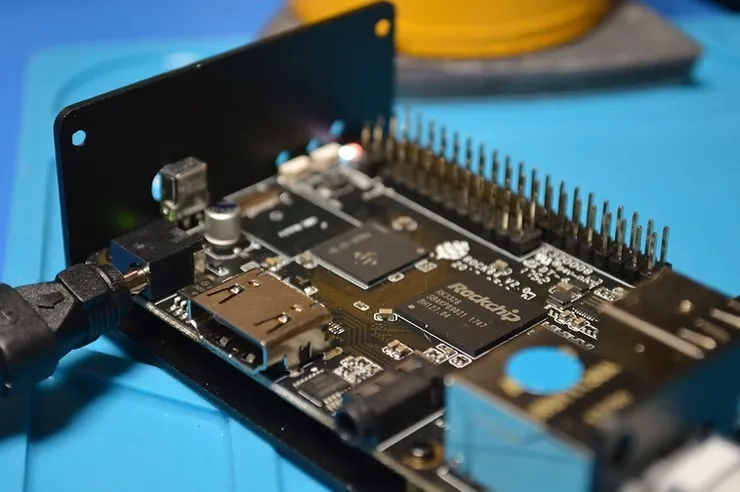
by admin | Nov 6, 2025 | WebRTC, Embedded, IOT, LibWebRTC
Introduction
WebRTC has become a cornerstone for real-time communication in web applications, enabling seamless audio, video, and data streaming directly in the browser. However, when it comes to IoT and embedded devices, leveraging WebRTC in a browser may not be the most efficient option. This is where compiling LibWebRTC natively for ARM devices comes into play. By doing so, developers can create highly optimized applications that significantly reduce CPU usage, resulting in lower power consumption and improved performance—key factors for IoT and embedded systems.
When you compile LibWebRTC for ARM, especially in the context of IoT and embedded devices, you unlock the potential to run real-time communication applications natively on ARM processors. This approach offers several advantages over using WebRTC within a browser, such as reduced latency, better resource management, and enhanced performance. The result is a more stable and reliable communication experience, which is crucial for applications in resource-constrained environments like smart homes, industrial IoT, and other embedded systems.
WebRTC for Embedded: Steps to Compile LibWebRTC for ARM
Compiling LibWebRTC for ARM, particularly for IoT and embedded devices, requires a few detailed steps. The following guide will help you through the process:
1. Set Up the Build Environment
Start by preparing an Ubuntu environment, either directly on an ARM device or on an x86 machine if you plan to cross-compile for ARM. Ensure that all necessary dependencies, such as Python, Git, and the build-essential package, are installed.
sudo apt-get update
sudo apt-get install build-essential python git
2. Fetch the LibWebRTC Source Code
Clone the depot tools repository, which is essential for managing the source code of LibWebRTC.
git clone https://chromium.googlesource.com/chromium/tools/depot_tools.git
export PATH="$PATH:/path_to_depot_tools"
Fetch the LibWebRTC source code using the following commands:
fetch --nohooks webrtc
cd src
gclient sync
3. Explore Available GN Build Options
Before generating the GN build files, it’s beneficial to review all available build options. This step ensures that you configure your build optimally for your IoT or embedded ARM device.
gn args out/Default --list
This command lists all configurable GN build options, allowing you to tailor the build process to your specific needs.
4. Set Up GN Configuration
Generate GN build files tailored to the target architecture, either ARM32 or ARM64.
For ARM32:
gn gen out/arm32 --args='target_os="linux" target_cpu="arm" is_debug=false is_clang=true use_custom_libcxx=false'
For ARM64:
gn gen out/arm64 --args='target_os="linux" target_cpu="arm64" is_debug=false is_clang=true use_custom_libcxx=false'
Selecting the correct target_cpu (either arm for ARM32 or arm64 for ARM64) is crucial for optimizing the build for your IoT or embedded device.
5. Compile the Code
Once the GN configuration is set, you can proceed to compile the code using Ninja.
For ARM32:
ninja -C out/arm32
For ARM64:
ninja -C out/arm64
The compilation process may take some time, depending on your system’s hardware capabilities.
6. Deploy and Test
After successfully compiling LibWebRTC for ARM, deploy the binaries to your target IoT or embedded device. Comprehensive testing is essential to ensure that all functionalities are working correctly and that the performance benefits specific to your device are realized.
Note:
While compiling for ARM devices, one should use this option is_clang=truewhich is required to compile the neon flags available in the ARM architecture for video rendering acceleration. The default GCC in the Ubuntu-based Linux systems is not capable of compiling these flags and complains about neon flags. Therefore, it is advisable to use the clang already provided by the LibWebRTC to compile it rather than using the system’s default C++ compiler which is GCC.
Summary
Compiling LibWebRTC for ARM devices, particularly in the context of IoT and embedded systems, offers significant advantages over using browser-based WebRTC. Native compilation allows you to fine-tune applications to run efficiently on ARM processors, resulting in lower CPU usage, reduced power consumption, and enhanced performance. This is especially important for IoT and embedded devices where resources are limited, and efficiency is paramount.
For businesses operating in the IoT and embedded systems domain, optimizing WebRTC for ARM devices by compiling LibWebRTC natively opens up a world of possibilities. It enables the delivery of high-quality video calls, low-latency data streaming, and efficient resource usage—all critical factors for success in this field. Whether you’re developing applications for remote healthcare, smart home devices, or industrial automation, the ability to provide reliable, real-time communication on low-powered ARM CPUs is a game-changer that can drive innovation and efficiency in your solutions.
We recently built a C++ video application for ARM devices (both 32-bit and 64-bit) to work with our existing cloud video infrastructure. From our recent experience, we can say that it’s not an easy task and needs significant effort to compile & build a native C++ video application. If you also have an IOT / Embedded video conferencing/streaming use case and don’t know where to start, do shout at hello@centedge.io. You also can schedule a video call with us to discuss your use case using our Meetnow page.
This technical article was first published here.
