We are super excited to inform that next generation of Centedge Video Rooms(CVR) is now live. Though this has been a minor release( v2.1), it has many important features like auto re-connection in case of a network outage at the user end, availability of detailed call logs for the meeting host in his / her dashboard and efficient video bandwidth optimisation to name a few. Apart from these important features, overall stability and usability of the video rooms have been improved greatly.
In this post, we are going to discuss the top 3 important improvements of this minor release and why we consider them important.
Network outage resiliency and Auto re-connection
In a private forum while discussing with some global experts in the WebRTC and Audio Video domain, our founder came to know that network condition in a country like India is not comparatively good like other developed countries with frequent to very frequent network outages during ongoing meetings. He also got a similar feedback from our regular users that many time the users need to rejoin a meeting due to network outage. Though the network outage only happens in the range of 2 – 30 seconds, the users audio video freezes inside the meeting. Then the user has to leave and rejoin the meeting in order to resume conversation.
A participant leaving and rejoining the meeting usually breaks the flow of the conversation while a meeting is going on and usually a recap is needed once the user rejoins the meeting. If each participant rejoin extends the meeting time by 5 -10 mins and if there are 2-3 rejoins happen in each meeting, then the meeting time is getting extended by 10 – 30 mins overall. In case a user joins 5 such meetings a day and 15 mins of additional meeting time needed for rejoin recap (which could have been avoided!) in every meeting, a total 75 mins(15% – 20%) is wasted in a 6-8 hours work day.
This made us implement the auto reconnect feature with a sense of urgency. Once implemented, it not only detects the network changes in the mobile devices(WiFi to LTE and vice versa), but also complete network outages like switching off the wifi / pulling out the Ethernet cable in the desktop computers. Once it detects a network outage, it informs all others in the meeting about a possible network outage of a participant and patiently waits for the network to comeback in the participants side. Once the network is back, it effortlessly auto reconnects the participant to the meeting and informs all others in the meeting that the participant is now back again.
The best way to test this feature for yourself is to join the demo room with a friend, switch off your wifi / pull out the Ethernet cable after a minute or 2 into the meeting, wait for 10 -30 seconds so that network will be completely dead and then switch on your wifi / reconnect your Ethernet cable to see if it can effortlessly reconnect you to the meeting again. Keep in mind that if you are not reconnecting your cable / switching on your wifi for 5 minutes, then the user will be considered permanently disconnected, no further re-connection attempt will be made and garbage collector will mark the participant as stale ready for garbage collection. The participant needs to rejoin the meeting anytime after 5 mins once his/ her network is back. The link to the demo room is here.
Detailed Call logs in the dashboard
A very important thing for the room owner is to know the detailed of past conversations that have happened. We consider details like start and end time, number of participants joined, total conversation time etc. are important for the room owner. Apart from this, there are a host of other information about each individual participant which may be of interest to the room owner. Individual participant details like name, room join time, room leave time, browser from which the participant has joined, the browser version, the operating system and network outage status. This will help the room owner understand more things about the participants in case the room is being used for small events or training sessions. A detailed rating and feedback system is in active consideration as an extension to call logs in the upcoming minor releases. There are no call logs for the demo room! Therefore if you wish to see call logs in your dashboard, you need to use your personal room or a metered room after signing up.
Efficient Video bandwidth optimisation
Efficient bandwidth optimisation is important in order to bring stability into any video conference. Every Kb of data counts when the network connection quality degrades. This is specially valid for video as video transmission is expensive on the network and encoding/decoding is heavy on the CPU of the participant device. Therefore, we have deployed a few techniques to effectively optimise bandwidth.
First we start the camera only after the participant intends to / allowed to share his / her video camera in side the meeting. Else it is a audio only conversation. Previously we used to acquire the camera at the start of the meeting if the user has camera but don’t share the camera stream with other participants until the participant intends to / allowed to share his / her video camera. This technique used to consume 50Kbps to 80Kbps of extra bandwidth from the participant side to send the blank video frames to server through out the meeting. In a ideal network condition, this technique has no problem but when network condition degrades, this extra 50 Kbps of data become a burden on the already choked network.Therefore we now only acquire the camera when it is really necessary and start the video transmission.
Once the video transmission is started, we have used a second technique called simulcast to send 3 video qualities to the server from the sender and decide at the server to select the video quality to send to the receiver based on the network quality of the receiver. This helps in efficient upgrade / downgrade of the video quality of the receiver with a goal to keep the receiver connected to the meeting at least with audio.
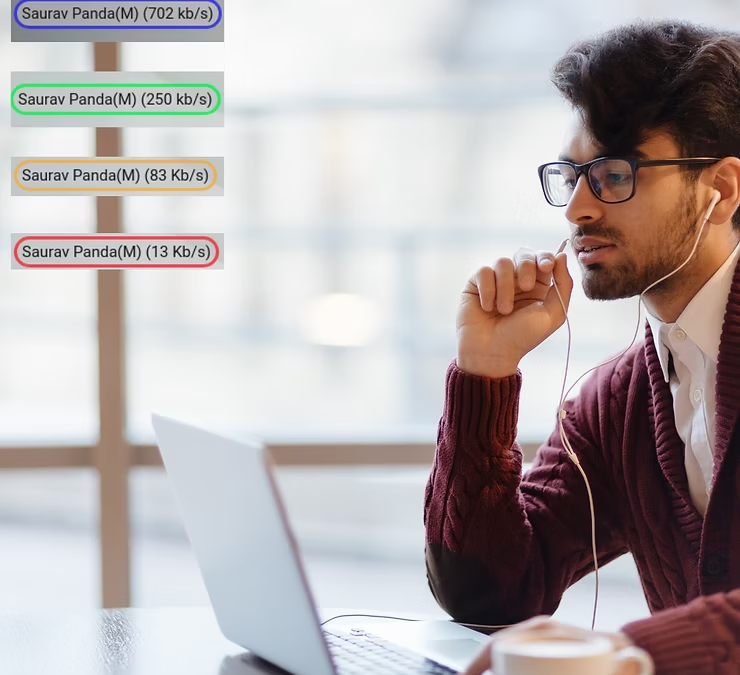
The 3rd technique we have used is to develop a small algorithm to calculate the real time bit-rate every participant is sending and receiving and then attaching a colour code to it. It informs everybody inside a meeting about everybody’s network capacity in real time. Anytime a participant’s colour turns red, everybody else inside meeting recognises about the possibility of a network outage for that participant.
We are not able to write details about all the other improvements due to limitation on time and resources currently available with us. If you have visited the CVR some time ago, then it is a good time to visit again.
We are reachable on email at hello@centedge.io if you wish to know more about CVR or Centedge. If you are interested in running a dedicated version of CVR for your enterprise use, in a custom Centedge subdomain like meet or you want to run it on your own domain like www.xyz.com, feel free to let us know. Also feel free to get in touch with us If you are looking for similar or new feature implementations in your existing services using WebRTC for video conferencing or live streaming.
You also can chat with us using the chat widget on this website. We typically respond within 5 minutes or sooner for chat and 1 day (max.) for email. Here is our LinkedIn page to stay connected.
They say the customer is always right. But this is not always true in case of building a production grade WebRTC video calling app which also can scale.
Why? Because the customer many times wants to build a world class video app like zoom / google meet within a time period of 3 months with a budget of $$$$ / 1$$$$.
How do they come to such conclusions about time and money?
They came to such conclusions because they read it on the internet that WebRTC is free as well as opensource and one can build an app like using zoom /google meet using WebRTC by downloading a random open source package with WebRTC as a keyword, from Github. They concluded afterwards that all things needed for a app like gmeet are available, either in WebRTC or in the open source package. They just need to build a new UI layer and a dashboard around WebRTC to challenge zoom / gmeet!
A notion that WebRTC is free and open source, things like gmeet can easily being built using it without much effort, is slowly built in mind of the customer. This notion is creating a lot of confusion between companies like us and the prospective customers. It takes us time to make the prospective customers understand the reality about WebRTC and the effort it takes to build production grade video applications using WebRTC.
Once the initial understanding is built that building a live video application is more than simple WebRTC, another issue arises. This time the issue is about building large enough video rooms which can possibly cater to may be a million users. A million users in one Room!
Again we need put efforts to understand the customers thought process by asking the right set of questions. It turns out that the customer currently has a teaching learning application where one teacher teaches one student at a time. They started by using gmeet for free to conduct such sessions but later they realized that they need more control along with deep integration of the calling feature to their dashboard. That’s why they are currently looking for an alternative which can provide deep integration to their dashboard while being cost effective. But they anticipate that their product will have explosive growth and will reach a million students within couple of years. That’s why they want to build a large enough video conferencing application which can scale to million users when it happens, in a couple of years.
Here again we need to put efforts to make our customers understand how a WebRTC application really works. We need discuss and explain to them the various kind of WebRTC architectures like p2p, full mesh multiparty, conferencing, live streaming, Webinar etc. Though we prefer to not to use much WebRTC jargons in the discussion, some time it becomes unavoidable when we need top explain them things like SFU, MCU, ICE/STUN/TURN, Media server, Recording Server, FFMPEG, GStreamer etc. After one or two rounds of discussions, they themselves realize that their current need can be very well satisfied in a p2p call occasionally with a TURN server. After all these discussions, they understand that building a production grade scalable p2p video call, takes much less time and resources than building a scalable production grade video conferencing application. It is a also a good starting point to test a market and the product, before investing more resources in building a scalable video conferencing application. It is immaterial that they choose a P2P app or conferencing app, in a couple of rounds of discussions, they equip themselves with all the necessary knowledge to understand the reality with WebRTC. From here on-wards, it becomes a rewarding experience to help the customer achieve his /her business objective.
After going though the above mentioned situation for a couple of time, we decides to build a scalable production grade WebRTC p2p video calling application with a loosely coupled UI. This way UI can be modified according to individual needs where as the architecture, the front end functionality and the back end stays the same. Though building a simple p2p app seems easy but building a scalable, production grade p2p video calling app with certain level of bad network tolerance is not so straight forward. Why? Because one need to take care of the below mentioned things in a production grade app which are generally not present in a simple p2p app available on Github.
Audio / Video management: This feature includes all possible things a user may need while using the app like muting / un-muting the mic, switching on / off the camera, changing of existing mic / camera to a new mic / camera for rest of the call, allowing moderator controls for remote media input change( so that a teacher can mute / un-mute the mic or switch on /off the camera of student in case of a need ) etc.
Capturing images / statistics: This feature helps in capture an image from the real time video stream for a purpose like vKYC(video Know Your Customer). With this feature, an bank agent can capture the image while the ban’s customer shows his / her photo identity card during the call for bank’s verification purposes. Collecting real time call and network statistics are also important for quality control and monitoring purposes. Also real time network monitoring can raise timely alerts to users when their network quality degrades.
Auto re-connection: This is primarily important for maintaining the call even when the network fails. A network typically fails when one’s device changes the network connection while a call is going on. It happens when a users’ device switches between WiFi and mobile network modes like 3G/4G / LTE etc. The network temporarily fails when the switch happens and comes back once the switch is over. In order to auto reconnect, an application need to detect network failure, wait until the network reconnects and restart the media communication as quickly as possible after the successful re-connection. In the WebRTC terminology, restoring the media communication is called ICE restart.
Integrations: Other application integrations like whiteboards for collaboration, text chat option, file sharing etc also play an important role for some users. Either these features should be there or a provision should be there for the integration of these features in case of a need.
Recording : Recording is another important feature in any WebRTC application. Though it may not be needed in all kinds of WebRTC applications, it becomes necessary for applications like video call centers, video health etc. Recording can happen either in client side or server side. Ideally a server side recording is preferred as it allows to post process the raw recording for multiple purposes. As an example, a video recorded in WebM format, the default recording format for WebRTC, consumes 800 MB – 1000 MB of space to store an hour long video recording which is a lot. In the server side, one can use a tool called FFMPEG to compress it, watermark it and convert it to MP4 format which can reduce the size to < 100MB for the same video. Once can use client side recording and send the file to server once the recording is done as an alternative strategy if server side recording is not possible( like a P2P call).
In call Media Manipulation: There may be a need for masking some portion of the video stream while in call for either for security or convenience purposes. A widely used feature these days for such a need is called background removal, where the background of a user sharing a camera is either blurred or replaced with another image of a coffee shop / office desk / meeting room etc. There may be other such use cases as well.
All of the above mentioned features along with a robust architecture ready for scale makes a production grade application. It takes a lot of efforts and time to build such an application with an excellent team with deep understanding of WebRTC and related technologies, frontend, backend, and many other such things.
If you are a customer looking forward to build a production grade scalable video calling app, then by now you know that you need to have a rock star team with solid understanding of WebRTC and related technologies along with sufficient time and resources at your disposal to venture on such an adventure. If you don’t have a rock star team or time at your disposal, then we are here to help in any of below mentioned way.
CP2P is our scalable production grade P2P video calling app ready for production deployment as a managed service. It comes with a very minimal UI ready for retro fitting. Either you can share your UI design and we build it for you or share the fully designed UI for integration. We can integrate , deploy in your servers / our servers and manage it for you in a cost effective manner. The link to view details and check it in action is there at the bottom of this page.
CVR is our scalable production grade video conferencing / live streaming / Webinar application ready for production deployment as a managed service. It uses our in house built from scratch WebRTC load balancer CWLB to distribute and balance load in real time with a utilization efficiency of 75%. It also uses CR, an in house advanced recording engine developed from scratch to record meetings. It uses Mediasoup as it’s core media server. The link to know more about it and schedule a demo is at the bottom of this page.
If you think that you don’t want to use any of these products, but want o develop it from scratch, we as an consulting company can help you build your own product from scratch. In this case, you need more resources and time then the previously mentioned options. If you have more resources and time at your disposal, then this can be a path to trade. The only thing to make sure in this case is that you have a dependable rock star team who can work with us for building the product.
In case you don’t have a rock start team, then there is a reason to worry. But why worry when we are here. We have an instructor led online / offline, full time training program where we can convert any fullstack / frontend / backend developer with sound javascript knowledge to rock star WebRTC developer. The timelines for the training program are as below.
5 – 7 days (for the WebRTC fundamentals program)
10 -14 days ( for the WebRTC fundamentals and advanced WebRTC with Mediasoup program)
I hope I was able to share enough information about building a scalable production grade video conferencing app. If you still have doubts or questions, you can reach out to me either on sp@centedge.io or on hello@centedge.io.
The link to schedule a free 30 mins discussion with one of our experts to resolve all your WebRTC related queries is here.
If you are student / developer looking forward to learn more about basics of WebRTC by yourself through working examples, here is a github repo with working examples on successful MediaStream acquisition, building a basic signalling server, and building a working P2P call app.
In a world where face-to-face communication is becoming increasingly digital, video chat platforms have made significant strides. Among these, open-source video chat solutions stand out as a powerful option for both businesses and individuals. By leveraging the flexibility and robustness of open-source technologies, developers can create customizable and cost-effective video communication solutions.
Open-Source Video Chat: A Cost-Effective Solution
One of the standout benefits of using open-source video chat platforms is their cost-effectiveness. Most open-source software is free to use, requiring only a minimal investment in hosting and development. This is particularly appealing for startups and small businesses looking to implement video communication without incurring hefty subscription fees.
For example, platforms such as Jitsi Meet provide high-quality video conferencing services without any licensing costs. A recent survey found that businesses can save up to 40% on software expenses when utilizing open-source alternatives rather than proprietary systems. This substantial cost saving allows businesses to allocate resources to other essential areas, such as marketing and product development.
Enhanced Customization and Control
Another significant advantage of open-source video chat platforms is the degree of customization they offer. Businesses can tailor features to suit their specific needs, creating a unique branding experience. Unlike proprietary systems, where users are confined to predetermined functionalities, open-source solutions allow developers to modify the codebase and create custom features as required.
For instance, companies might add specific integration capabilities with third-party tools or develop custom security protocols to protect sensitive information. This level of flexibility means organizations can employ video chat platforms that align perfectly with their operational needs, enhancing user experience and productivity.
Developer customizing open-source video chat software
Security and Privacy Considerations
In today’s digital age, security and privacy are paramount. Open-source video chat platforms often provide enhanced security features compared to their proprietary counterparts. Since the source code is publicly accessible, developers and security experts worldwide can examine it for vulnerabilities, leading to quicker fixes and updates.
Moreover, businesses can host their open-source solutions on their own servers. This gives them complete control over data storage and transmission, reducing the risk of data breaches. According to a report from Cybersecurity Ventures, the average cost of a data breach reached $3.86 million in 2020. By choosing open-source options, organizations can mitigate these risks by implementing their security measures tailored to their unique requirements.
Server room showcasing secure hosting for video chat platforms
Community Support and Continuous Development
One of the greatest strengths of open-source software is the community that supports it. Many open-source video chat platforms, such as BigBlueButton and Jitsi, have large user bases that collaborate to enhance the software continually. This means that users can benefit from regular updates, new features, and community-driven support.
In contrast to proprietary software, where users often rely solely on a company’s customer service, open-source solutions offer a diverse source of support. Community forums, online documentation, and tutorials are readily available, empowering users to troubleshoot and resolve issues on their own.
Furthermore, community contributions to the development of open-source software help maintain its relevance. New features and improvements are routinely introduced based on user feedback, ensuring that the platforms evolve alongside user expectations and technological advancements.
A Future-Proof Communication Solution
As the landscape of digital communication continues to evolve, open-source video chat platforms are poised to play a significant role. The rapid advancement of technologies such as artificial intelligence and augmented reality presents numerous opportunities for integration into video chat applications.
For businesses that want to remain agile, adopting open-source solutions allows them to stay ahead of the curve. Since the source code is adaptable, companies can incorporate emerging technologies into their existing systems without starting from scratch, thus future-proofing their communication solutions.
Moreover, organizations can avoid vendor lock-in, allowing them to pivot and innovate as new technologies emerge. This adaptability to change is critical for today’s fast-paced business environment.
Real-World Examples of Open-Source Video Chat Success
Many organizations around the world have successfully implemented open-source video chat platforms to meet their communication needs.
Sustainable Development Goals (SDGs): The United Nations has utilized Jitsi Meet to facilitate discussions around its Sustainable Development Goals. This platform allows for global participation while keeping costs low and ensuring security.
Educational Institutions: Universities and colleges have turned to BigBlueButton for remote learning. This platform combines video chat, screen sharing, and interactive whiteboarding, making it a comprehensive solution for online classes.
Small Businesses: Startups are increasingly using open-source solutions like Nextcloud Talk for internal communication. This allows teams to communicate seamlessly while maintaining strict data privacy control.
These successful case studies illustrate the versatility and effectiveness of open-source video chat solutions across various sectors.
Embracing Open-Source Video Chat
As businesses and individuals increasingly rely on technology for communication, embracing open-source video chat platforms offers numerous advantages. From cost savings and customization to enhanced security and community support, these platforms cater to a wide array of needs.
For those looking to explore these benefits, consider visiting Open-Source Video Chat to discover a world of opportunities. By opting for an open-source solution, you’re not just choosing a software; you’re joining a community, unlocking your technological potential, and positioning yourself for future success.
With the right open-source video chat platform, the possibilities for improved communication are virtually limitless. Start exploring today and unlock the full potential of your digital communication strategy!
Is open source not the correct option for you? Are you looking for a commercial video conferencing solution which comes with great customization options, global scalability and backed by a team of developers building video conferencing solutions for Enterprises for more than a decade now? Then check out Samvyo, a cutting edge Enterprise ready video conferencing/interactive live streaming/Embedded Webrtc / Video sdk solution to know more.