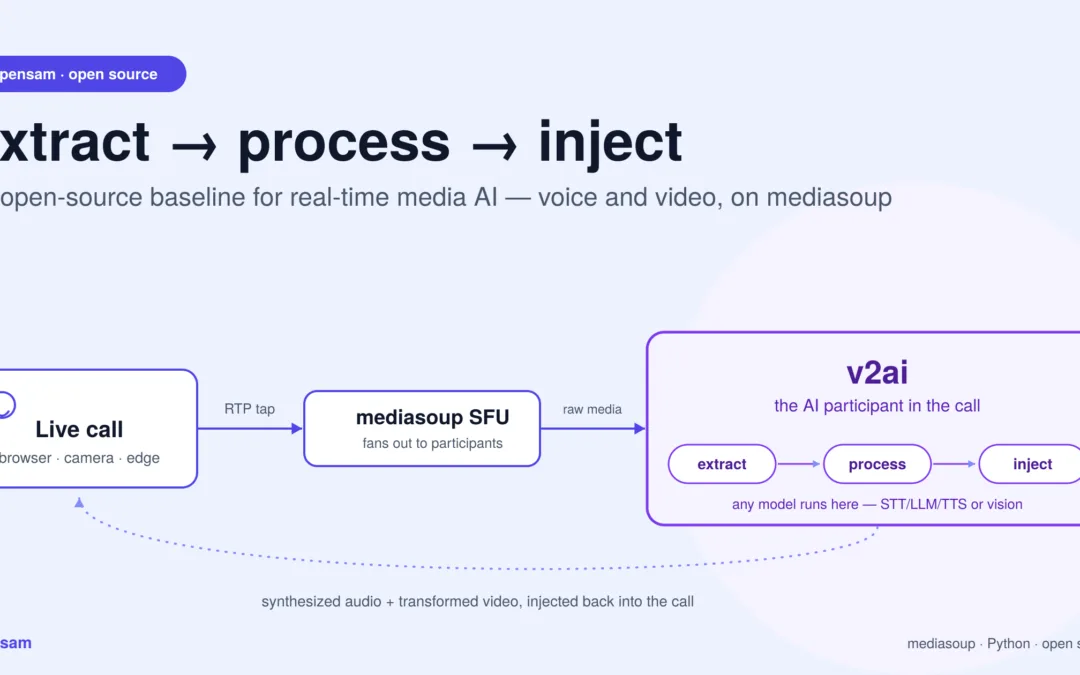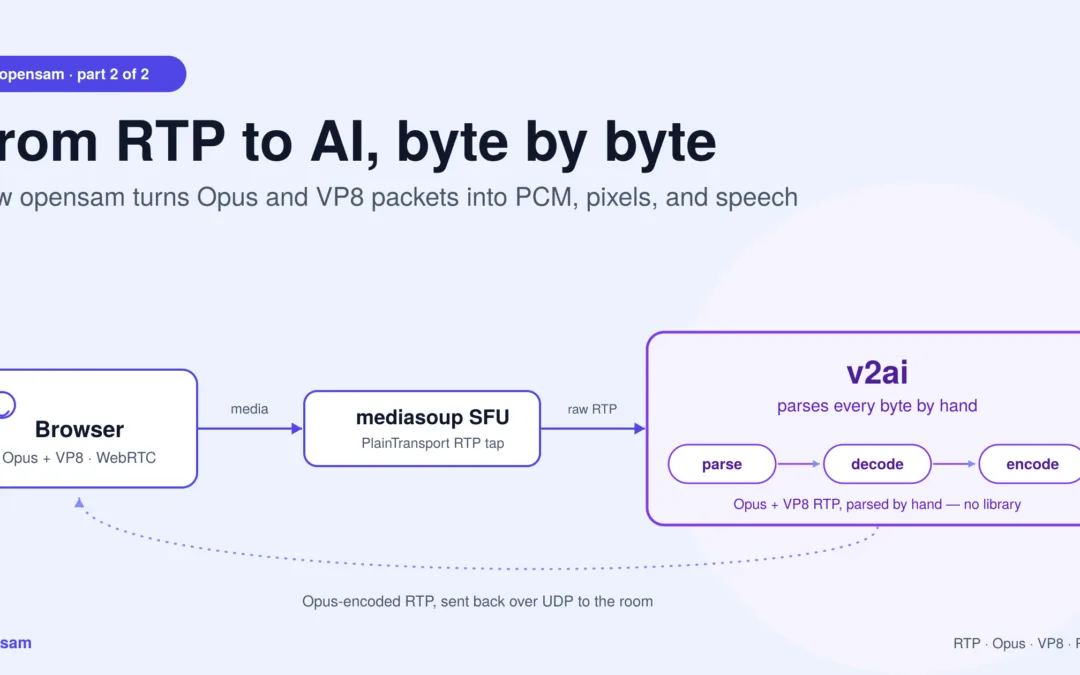
Building real-time media AI pipeline with opensam: From RTP Packets to AI and Back, Byte by Byte
The promised technical tour — how an AI process taps a mediasoup SFU, turns Opus and VP8 packets into PCM and pixels, runs them through models, and streams synthesized speech back into a live call.
This is the second of two posts. The first covered what
opensamlets you build and why an owned baseline matters. This one is the how: the plumbing, the codecs, and the loop.
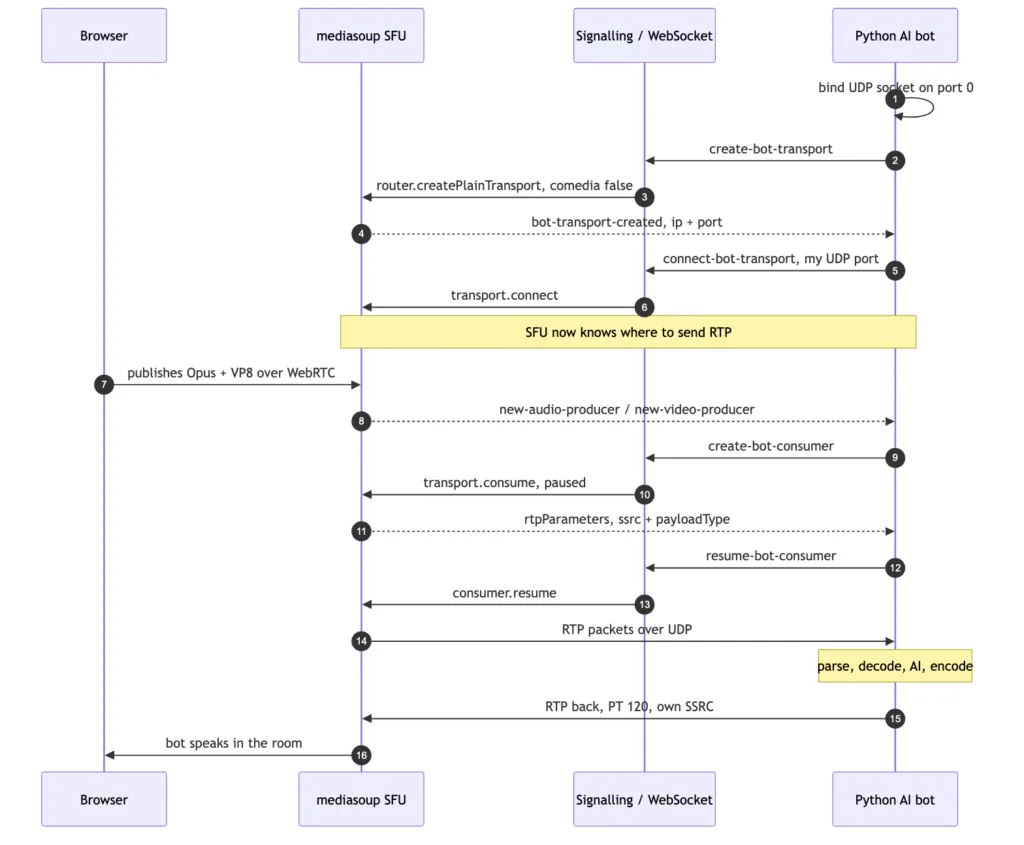
The tap handshake: how a plain Python process becomes a participant in a mediasoup call — and the exact moment RTP starts flowing.
What this pipeline actually does, in one paragraph
opensam‘s real-time media AI pipeline is the code path between a browser’s WebRTC stream and an AI model: it taps a mediasoup SFU over a PlainTransport, parses raw RTP by hand into Opus audio and VP8 video, decodes both to PCM and pixel frames, runs them through STT/LLM/TTS or vision models, and re-encodes the result as RTP packets sent back into the room. No framework sits between you and any of those steps — everything below is the literal path the bytes take.
Why this layer is worth understanding
Every real-time media-AI framework eventually does what’s described below — it just does it behind an abstraction. The reason to look at it directly is simple: the abstraction is where your unusual requirement goes to die. When you need a video frame at a different cadence, a codec nobody templated, or media injected back on a path the framework didn’t anticipate, you need to know what’s actually on the wire.
opensam is small enough to hold in your head. Here’s the whole path through this real-time media AI pipeline.
1. The tap: getting RTP out of an SFU
A browser’s media reaches the SFU over WebRTC — DTLS-encrypted, ICE-negotiated, the full stack. An AI process doesn’t want any of that. It wants raw packets.
mediasoup’s answer is PlainTransport: a transport that speaks plain, unencrypted RTP over UDP. The server creates one per bot:
js
const transport = await room.router.createPlainTransport({
  listenIp: { ip: '127.0.0.1' },
  rtcpMux: true,      // RTP and RTCP share one port
  comedia: false,     // we will tell the SFU where to send
});
comedia is the subtle knob, and opensam uses it in both directions:
- Receiving (
comedia: false) — the bot binds its own UDP socket on port0(the OS picks a free port), reads the assigned port back, and hands it to the server over WebSocket signalling. The server callstransport.connect({ ip, port })and now knows exactly where to fire packets. - Sending (
comedia: true) — the reverse. The SFU learns the bot’s source address from the first packets it receives. That’s why the bot fires five 440 Hz tone frames on startup: they’re a warm-up whose only job is to teach mediasoup where the bot lives. Without them, the SFU has no return address.
Media doesn’t flow at connect() though. It flows when a consumer is created against a producer and resumed:
js
const consumer = await entry.transport.consume({
  producerId, rtpCapabilities: room.router.rtpCapabilities, paused: true,
});
// ...later
await consumer.resume();   // <- the exact moment RTP starts hitting the bot's socket
Consumers are created reactively: when a participant publishes, the server emits new-audio-producer / new-video-producer over signalling and the bot spins up a consumer for it. People joining late Just Work. The consumer’s rtpParameters come back with the SSRC and payload type — and the bot records ssrc → peerId, which is how it later knows who is speaking.
Crucially, audio and video consumers share the same plain transport — so both land on one UDP socket, interleaved, distinguished only by payload type.
2. One socket, two media types: parsing RTP by hand
There’s no RTP library here. The bot reads a datagram and walks the bytes.
An RTP header is 12 bytes minimum:
 0                   1                   2                   3
 0 1 2 3 4 5 6 7 8 9 0 1 2 3 4 5 6 7 8 9 0 1 2 3 4 5 6 7 8 9 0 1
+-+-+-+-+-+-+-+-+-+-+-+-+-+-+-+-+-+-+-+-+-+-+-+-+-+-+-+-+-+-+-+-+
|V=2|P|X|  CC   |M|     PT      |       sequence number         |
+-+-+-+-+-+-+-+-+-+-+-+-+-+-+-+-+-+-+-+-+-+-+-+-+-+-+-+-+-+-+-+-+
|                           timestamp                           |
+-+-+-+-+-+-+-+-+-+-+-+-+-+-+-+-+-+-+-+-+-+-+-+-+-+-+-+-+-+-+-+-+
|                             SSRC                              |
+-+-+-+-+-+-+-+-+-+-+-+-+-+-+-+-+-+-+-+-+-+-+-+-+-+-+-+-+-+-+-+-+
Three details matter in practice:
RTCP shares the port. With rtcpMux: true, receiver reports and PLIs arrive on the same socket. They’re filtered by checking whether byte 1 falls in the RTCP packet-type range (200–206) and discarded.
The header is variable-length. Real size is 12 + (CC × 4), and if the X bit is set, plus 4 + (extension_length × 4). Getting this wrong hands your decoder garbage.
The header extension carries a gift. WebRTC negotiates the one-byte extension profile 0xBEDE, and inside it, extension ID 6 is ssrc-audio-level — the browser’s own measurement of how loud that packet is, 0 = loud, 127 = silence. The bot parses it and skips packets above a threshold of 40 before they ever reach the Opus decoder. It’s a free VAD pre-filter computed by the sender.
Dispatch is then one branch: payload type 101 → VP8, anything else → Opus.
3. The audio path: Opus → PCM → 16 kHz mono
mediasoup delivers Opus as the browser encoded it: 48 kHz, stereo, 20 ms frames — 960 samples per channel.
python
self.decoders[ssrc] = opuslib.Decoder(48000, 2)
pcm = self.decoders[ssrc].decode(opus_bytes, 960)   # -> 3840 bytes
That’s 960 samples × 2 channels × 2 bytes = 3840 bytes of PCM per packet. A decoder is created per SSRC — each speaker gets their own, because Opus is stateful.
That statefulness drives the error handling. A corrupt or missing packet doesn’t just lose 20 ms; it poisons the decoder. So on a decode exception the bot rebuilds the decoder, returns a frame of silence, and skips the next three packets to let the stream resynchronize. Crude, but it prevents one bad packet from producing seconds of noise.
Speech models want mono at 16 kHz, so the final step is a downmix and resample:
python
stereo   = np.frombuffer(pcm_48k_stereo, dtype=np.int16).reshape(-1, 2)
mono_48k = stereo.mean(axis=1).astype(np.int16)
mono_16k = self.resamplers[ssrc].resample_chunk(mono_48k)   # soxr, 48k -> 16k
Going down in rate is the direction that actually demands care: without a low-pass filter first, everything above 8 kHz folds back into the audible band as aliasing — and you’d be feeding that to your STT. soxr filters properly, and it keeps one resampler per SSRC, mirroring the per-SSRC Opus decoders, so one speaker’s filter state never bleeds into another’s.
Out the other side: clean 16 kHz mono PCM, tagged with the SSRC that produced it — which resolves to a participant name.
4. The listening loop: VAD → STT → LLM → TTS
PCM lands on an asyncio.Queue, and a forwarding task turns a stream of packets into utterances.
Silero VAD is picky: exactly 512 samples at 16 kHz — 1024 bytes, 32 ms. So the loop accumulates PCM into a buffer and drains it in exact 1024-byte chunks, converting each to a normalized float32 tensor and running the model (in an executor, so the event loop keeps breathing).
Around that sits a small state machine with hysteresis:
- 2 consecutive speech chunks confirm onset (~64 ms) — short enough to feel instant, long enough to reject a cough.
- 20 consecutive silence chunks (~640 ms) end the utterance and trigger
finalize(), flushing the buffered speech to STT.
Speech chunks stream to Deepgram live (Whisper is the offline fallback). Transcripts below 0.70 confidence are dropped. Survivors get a wake-word check, then PII scrubbing before any text reaches the LLM.
The LLM stage streams from Claude — and the interesting trick is that it doesn’t wait for the full reply. It splits the token stream on phrase boundaries (.!?;:) and pushes each finished phrase onto a TTS queue immediately. The bot starts speaking the first clause while the model is still writing the rest. That single decision is worth more perceived latency than any model swap.
Tool use loops the conversation at most twice: Claude may call summarise_meeting or extract_action_items, the bot builds the context from its transcript log, feeds the result back, and Claude streams its spoken reply.
Barge-in is blunt and effective: any confirmed speech while the bot is talking cancels every active TTS task and drains the queue. The human always wins.
Wrapped around all of it: OpenTelemetry spans per stage, a circuit breaker that trips to a canned fallback line when the LLM misbehaves, and a per-room token/cost tracker.
5. The video path: VP8 → frames → vision
When payload type is 101, the bytes take a different road.
After the RTP header comes the VP8 payload descriptor (RFC 7741) — a variable-length preamble that is not part of the codec bitstream and must be removed:
- Byte 0:
X N S R PPPP—Xsays an extension byte follows. - Extension byte:
I L T K RRRR. - If
I: PictureID is 1 or 2 bytes, decided by the top bit of the first byte. - If
L: TL0PICIDX, 1 byte. IfTorK: they share 1 byte.
Only what’s left is VP8.
Then reassembly. A video frame is far bigger than a UDP datagram, so it arrives in fragments. The bot accumulates payloads per SSRC and treats the marker bit as “frame complete”:
python
self.frame_buffers[ssrc].extend(payload)
if marker == 0:
    return []                       # not done yet
complete_frame = bytes(self.frame_buffers[ssrc]); self.frame_buffers[ssrc].clear()
Before decoding, a keyframe gate. PyAV cannot decode inter frames without a reference, and a bot that joins mid-stream arrives in the middle of a GOP. VP8 marks frame type in bit 0 of the first byte (0 = keyframe), so inter frames are dropped until the first keyframe appears. To avoid waiting for the browser’s natural keyframe interval, the bot asks for one: a request-keyframe signal triggers consumer.requestKeyFrame() on the server, which sends a PLI upstream and the browser produces a keyframe immediately.
Decode is PyAV: av.CodecContext.create("vp8", "r"), wrap the bytes in an av.Packet, get VideoFrames. On error, reset the codec and re-arm the keyframe gate.
Raw frames are then sampled to ~1 fps — you don’t need 30 fps to summarize a slide, and vision tokens cost money — JPEG-encoded at quality 85, and handed to a vision chain that tries Claude Sonnet, falls back to on-prem LLaVA, then Haiku. Nothing runs unless the sharing participant has ticked the AI-consent box.
6. The return path: PCM → Opus → RTP → the room
Injection is the mirror image, hand-rolled — the last leg of the real-time media AI pipeline, and the one most frameworks hide completely.
TTS audio is normalized once per utterance — RMS measured, gain applied toward a target dBFS, capped and clipped — then handed to the sender, which:
- Resamples to 48 kHz stereo, honoring the rate the frame declares.
- Buffers and drains in exact 3840-byte frames — Opus will not accept a partial frame.
- Encodes with
opuslib.Encoder(48000, 2, APPLICATION_VOIP). - Builds a 12-byte RTP header by hand:
byte0 = 0x80(V=2),PT = 120, sequence+1, timestamp+960, fixed SSRC. sendto()the SFU.
Step 1 deserves more respect than it usually gets, because of an invariant that runs through this whole layer: every RTP packet carries exactly 20 ms. The timestamp advances by a fixed 960 ticks whether or not the audio inside it is correct. Nothing downstream will tell you the rate was wrong — the stream stays perfectly well-formed and simply plays at the wrong speed.
TTS rates vary in practice: Deepgram and Cartesia render at whatever TTS_SAMPLE_RATE asks for, while Kokoro ignores the request and always renders at its native 24 kHz. So the input rate is a fact to be read, never assumed:
python
def send_audio(self, pcm_mono: bytes, sample_rate: int, num_channels: int = 1):
    if num_channels == 2:
        stereo = np.frombuffer(pcm_mono, dtype=np.int16).reshape(-1, 2)
        pcm_mono = stereo.mean(axis=1).astype(np.int16).tobytes()
    pcm_48k = self._to_48k_stereo(pcm_mono, sample_rate)
    self._send_buffer.extend(pcm_48k)
    # ...drain in exact 3840-byte frames
Two details make this correct rather than merely plausible:
The resampler is stateful. A resampler is a filter, and a filter has memory. Audio arrives in ~1024-sample chunks, and one restarted at every chunk boundary produces a click at every seam — 20-odd times a second. soxr.ResampleStream carries its state across calls, so the chunks join as one continuous signal:
python
self._resampler = soxr.ResampleStream(sample_rate, SAMPLE_RATE, 1,
                                      dtype="int16", quality="HQ")
mono = self._resampler.resample_chunk(mono)   # state persists between calls
Interpolation, not repetition. Repeating each sample N times (a zero-order hold) is only coincidentally right when the ratio is an exact integer, and it’s a stair-step waveform with audible aliasing even then. A real resampler interpolates and handles non-integer ratios — which is the whole point, since the code shouldn’t care whether it’s handed 16 kHz, 24 kHz, or 48 kHz.
The one thing to understand about a proper resampler is that it holds about 20 ms inside its filter. That reads like lost audio until you measure it: stream 10 seconds and you’re 20 ms short; stream 30 seconds and you’re still 20 ms short. It’s constant latency, not accumulating drift — and those samples aren’t lost, they emerge as the next chunk pushes them through (the comfort-noise worker guarantees there’s always a next chunk).
The payoff is a timing invariant you can actually assert: feed five seconds of audio at 16 kHz, 24 kHz, or 48 kHz, and five seconds of speech comes out — every time.
The declaration has to be true
A resampler that honors a declared rate is only as good as the declaration, and this is where it gets interesting. The obvious design — “read the rate from config” — is wrong, because config describes what was requested, not what was rendered. Kokoro ignores the request entirely.
Worse, the provider isn’t fixed for the lifetime of the process. Cartesia owns a fallback chain — Cartesia → Deepgram → Kokoro — so a single failed API call means this sentence comes back at 24 kHz while the previous one was at 16 kHz. Config can’t express that; only the object that produced the bytes knows.
So each provider reports its own truth, and the chain updates it to match whoever actually served the utterance:
python
class KokoroTTS:
    def __init__(self):
        self.sample_rate = KOKORO_SAMPLE_RATE   # 24kHz, whatever config says
python
kk = KokoroTTS()
self.sample_rate = kk.sample_rate   # the chain adopts the fallback's rate
The consumer then reads the rate from the provider rather than from config — and, importantly, reads it after the stream is drained, when it reflects who really answered:
python
tts_rate = getattr(tts, "sample_rate", Config.TTS_SAMPLE_RATE)
frame = AudioFrame(audio=chunk, sample_rate=tts_rate, num_channels=1)
This is the general shape of the lesson, and it outlives this codebase: in a media pipeline, metadata must travel with the payload. The moment a rate, a codec, or a channel count is inferred from configuration instead of read from the thing that produced the bytes, you’ve built a system that is correct only until the first fallback fires — and it will fail silently, because a wrong sample rate produces a perfectly well-formed stream.
The server was told what to expect via make_rtp_parameters(ssrc, payload_type=120) at create-bot-producer time — the bot’s declaration of its own codec, clock rate, channels, and SSRC. A comfort-noise worker keeps silent frames flowing when nobody’s talking, so the stream never goes stale.
That’s the loop, closed: browser → SFU → UDP → parse → decode → AI → encode → RTP → SFU → browser.
7. Sharp edges (and why they’re there)
A baseline earns trust by being honest about its shortcuts. These are deliberate trades for readability, and the first things to revisit if you push this real-time media AI pipeline past a POC:
- Payload type 101 is hardcoded for VP8, and everything else is assumed to be Opus. The server does return the real payload type in
rtpParameters— the bot just doesn’t read it. It works because this router’s two-codec config lands there; add a codec or enable RTX and audio/video misroute. - Video decodes inline on the audio loop. Audio reads go through an executor, but VP8 decode and JPEG encode run in the same coroutine — under heavy screen share, that’s audio jitter.
- No jitter buffer, no sequence reordering. Frames are reassembled by concatenation and the marker bit. UDP reordering or loss yields a corrupt frame and a decoder reset.
- A fixed SSRC of
12345678identifies the bot’s outgoing stream. Fine for one bot; not fine for many in a room. - The bot’s own audio is never echo-cancelled. It works because the bot’s speech goes out on a different path than the audio it consumes — but put a real speaker and mic in the loop and you’ll want AEC.
None of these are mysteries. That’s the point: you can see every one of them, because the code is 400 lines you can read, not a framework you must trust.
POC now, production later
Disclaimer.
opensamis intended for proof-of-concept and educational use. It is a reference baseline for understanding and prototyping real-time media AI — deliberately minimal and readable. It is not hardened for production: it does not guarantee the latency budgets, jitter resilience, packet-loss recovery, multi-tenant scale, or security posture that live products require.
Read this stack to learn exactly where the bytes go and what your product actually needs. When the POC earns the right to ship, the Samvyo media stack delivers these same capabilities — transport, raw media access, audio and vision pipelines, media injection — engineered for the latency, scale, resilience, and compliance production demands. Prototype this real-time media AI pipeline on the open baseline; productionize on the stack built for it.
Read the code
The whole media path is a handful of files on the development branch under v2ai/ai-bot/src/pipeline/:
| File | What it owns |
|---|---|
signalling.py | The tap handshake — transports, consumers, comedia, PLI |
rtp_receiver.py | RTP parsing, RTCP filtering, audio-level extension, Opus decode, VP8 dispatch |
vp8_decoder.py | Descriptor stripping, reassembly, keyframe gate, PyAV decode |
bot.py | VAD state machine, STT, streaming LLM, barge-in, TTS orchestration |
rtp_sender.py | Opus encode, hand-built RTP headers, injection back into the SFU |
bash
git clone git@github.com:Samvyo/opensam.git && cd opensam && git checkout developmentFork it, instrument it, break it. Once you can see the packets, nothing about a real-time media AI pipeline is magic anymore.
Frequently asked questions about opensam’s RTP-to-AI pipeline
What is a real-time media AI pipeline?
A real-time media AI pipeline is the code path that moves a live audio or video stream from a call into an AI model and back — parsing the transport protocol (RTP), decoding the codec (Opus for audio, VP8 for video) into raw PCM or pixel frames, running inference, then re-encoding and injecting the result back into the call, all with latency low enough to feel live.
What is mediasoup’s PlainTransport and why does opensam use it?
PlainTransport is a mediasoup transport that sends and receives plain, unencrypted RTP over UDP instead of the DTLS-encrypted, ICE-negotiated path a browser uses. opensam’s AI bot creates one PlainTransport per bot so it can read raw RTP packets directly, without implementing the full WebRTC handshake just to access media it will immediately decode.
What does comedia do in mediasoup, and how does opensam use it?
comedia controls whether a PlainTransport learns its remote address automatically. opensam sets comedia: false when receiving — the bot explicitly tells the SFU its UDP port via signalling — and effectively comedia: true behavior when sending, firing five silent warm-up tone frames so the SFU learns the bot’s source address from the first packets it sees.
How does opensam decode Opus RTP audio into PCM in Python?
opensam creates one opuslib.Decoder(48000, 2) per SSRC (per speaker, since Opus is stateful), decodes each 20 ms packet into 3840 bytes of 48 kHz stereo PCM, downmixes to mono, then resamples to 16 kHz with soxr — a proper filtering resampler, since a naive downsample would alias frequencies above 8 kHz into the audible band before the audio reaches speech-to-text.
How does opensam decode VP8 video from RTP packets?
opensam strips the VP8 payload descriptor defined in RFC 7741, reassembles fragmented RTP payloads into a complete frame using the RTP marker bit, drops inter frames until a keyframe arrives (requesting one via PLI if needed), and decodes the result with PyAV’s av.CodecContext.create("vp8", "r") into raw video frames.
Why does opensam parse RTP by hand instead of using an RTP library?
Parsing RTP directly — reading the 12-byte header, handling the variable-length extension, filtering RTCP by packet type — keeps the entire real-time media AI pipeline visible and debuggable in a few hundred lines of Python, rather than hidden inside a general-purpose library’s abstractions. It also lets opensam extract non-standard data, like the browser’s ssrc-audio-level header extension, as a free VAD pre-filter.
How does opensam send AI-generated speech back into a mediasoup call?
Text-to-speech audio is resampled to 48 kHz stereo with a stateful soxr.ResampleStream, buffered into exact 3840-byte Opus frames, encoded with opuslib.Encoder(48000, 2, APPLICATION_VOIP), wrapped in a hand-built 12-byte RTP header with an incrementing sequence number and timestamp, and sent over UDP to the SFU via sendto().
Why does the TTS sample rate matter so much in a real-time media AI pipeline?
Every RTP packet in this pipeline is assumed to carry exactly 20 ms of audio; the timestamp advances by a fixed amount regardless of whether the sample rate is correct. Because TTS providers can render at different native rates (and fail over to one another mid-stream), opensam reads the sample rate from whichever provider actually produced the audio rather than from static configuration — otherwise the stream stays well-formed but plays back at the wrong speed, silently.
What are opensam’s known limitations in this pipeline?
opensam hardcodes payload type 101 for VP8, decodes video inline on the audio coroutine (risking jitter under heavy screen share), has no jitter buffer or RTP sequence reordering, uses a fixed outgoing SSRC (fine for one bot, not many), and does not echo-cancel its own audio. These are documented, deliberate trade-offs for a proof-of-concept baseline, not hidden defects.
Where is opensam’s RTP pipeline code?
The pipeline lives under v2ai/ai-bot/src/pipeline/ on the development branch at github.com/Samvyo/opensam, split across signalling.py (the tap handshake), rtp_receiver.py (RTP parsing and Opus decode), vp8_decoder.py (VP8 reassembly and decode), bot.py (the VAD/STT/LLM/TTS loop), and rtp_sender.py (encoding and injection back into the SFU).